
If you’ve ever gone looking for a free editable, printable calendar, you’ll know how it goes. You find one that looks right, then discover you have to sign up for something, it’s covered in watermarks, or it’s a PDF you can’t type on.
So I made my own. This 2027 family calendar is completely free, there’s nothing to sign up for, and you can type straight into it in Word, Excel or PowerPoint before you print it. The UK bank holidays are already marked, along with the dates families tend to forget, like Mother’s Day and when the clocks change.
Download Your Free Editable 2027 Calendar
Pick the version that suits you. They’re all the same calendar, set up for A4 landscape, so they’ll print straight away on a normal home printer.
Prefer A5? Download the A5 versions instead: Word · Excel · PowerPoint
Free to use: the calendar is free for personal, family and classroom use. If you’d like to share it, please link to this page rather than uploading the files somewhere else.
What’s in the Calendar
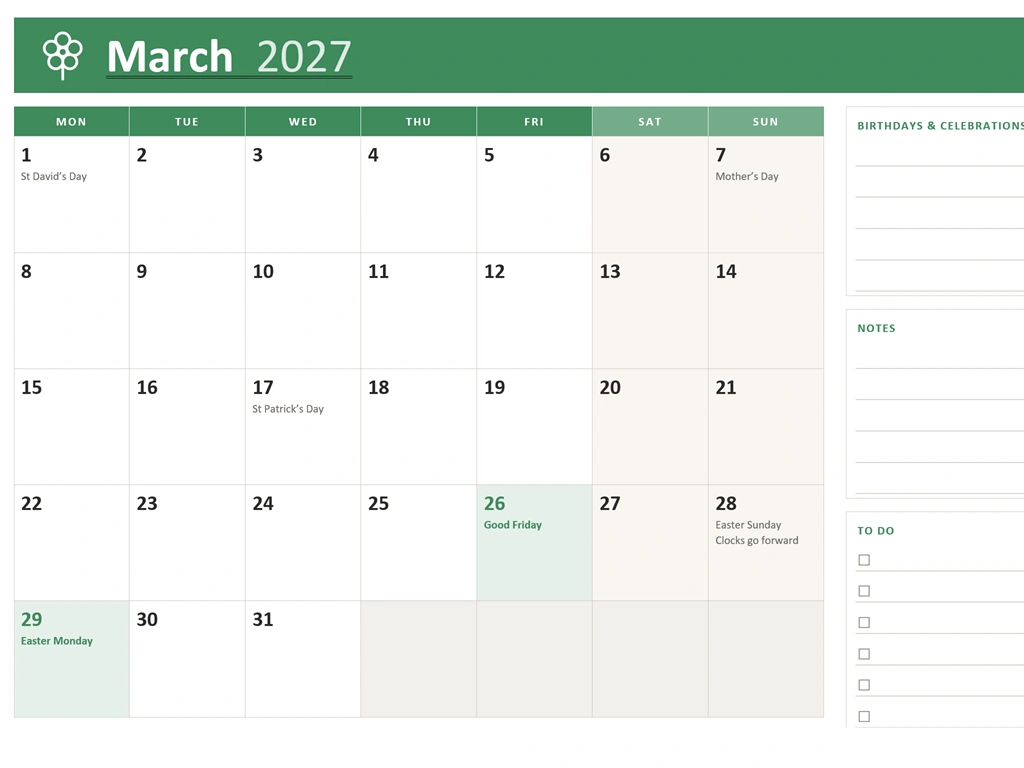
- A page for every month, with a big box for each day
- Space for birthdays and celebrations, notes and a to-do list on every month
- UK bank holidays shaded in, so you can spot the long weekends at a glance
- A year-at-a-glance page with all 12 months, the bank holidays and other key dates
- A blank cover page, ready for a family photo or your own design (Word, Excel and PowerPoint versions)
- A4 and A5 versions, so it fits whatever paper you use
- Weeks that start on Monday, the way most UK calendars do
- A different colour and a little seasonal picture for each month
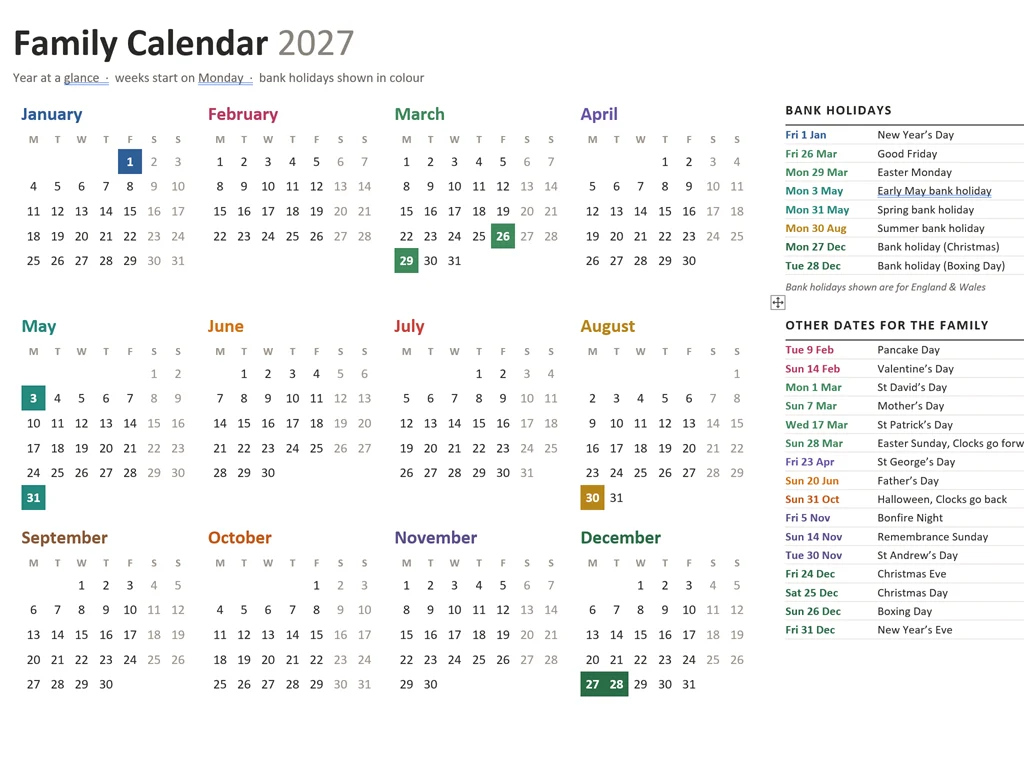
UK Bank Holidays 2027
These are the 2027 bank holidays for England and Wales, which are the ones marked on the calendar:
| Date | Bank Holiday |
|---|---|
| Friday 1 January | New Year’s Day |
| Friday 26 March | Good Friday |
| Monday 29 March | Easter Monday |
| Monday 3 May | Early May bank holiday |
| Monday 31 May | Spring bank holiday |
| Monday 30 August | Summer bank holiday |
| Monday 27 December | Because Christmas Day is on a Saturday |
| Tuesday 28 December | Because Boxing Day is a Sunday |
Christmas Day and Boxing Day 2027 fall on a Saturday and Sunday, so the bank holidays move to the Monday and Tuesday after.
Scotland and Northern Ireland are slightly different:
- Scotland: Monday 4 January (substitute day for 2 January), Monday 2 August instead of 30 August, and Tuesday 30 November (St Andrew’s Day). Easter Monday isn’t a bank holiday in Scotland.
- Northern Ireland: everything in the England and Wales list, plus Wednesday 17 March (St Patrick’s Day) and Monday 12 July (Battle of the Boyne).
If you live in Scotland or Northern Ireland, just type these into the calendar yourself. You can check the official dates on the GOV.UK bank holidays page.
Other Dates Marked on the Calendar
- Pancake Day: Tuesday 9 February
- Valentine’s Day: Sunday 14 February
- Mother’s Day: Sunday 7 March
- Easter Sunday: 28 March
- Clocks go forward: Sunday 28 March (yes, Easter morning, so you lose an hour’s sleep)
- Father’s Day: Sunday 20 June
- Halloween and clocks go back: Sunday 31 October
- Bonfire Night: Friday 5 November
- Remembrance Sunday: 14 November
- Christmas Eve, Christmas Day, Boxing Day and New Year’s Eve
- St David’s, St Patrick’s, St George’s and St Andrew’s days
Which Version Should I Download?
All four versions look the same when printed. The difference is how you fill them in.
| Version | Best for | How you fill it in |
|---|---|---|
| Word | Most people | Click in a day box and type |
| Excel | People who are happiest in a spreadsheet | Each date has rows underneath, one entry per row |
| PowerPoint | Moving things around and adding your own touches | Every box can be moved, resized and recoloured |
| PDF (A4) | Printing and writing on by hand | Print it out and grab a pen |
If you’re not sure, go with Word. And if what you really want is a calendar with a photo on every month, the photo calendar is the one for you.
How to Fill In Your Calendar
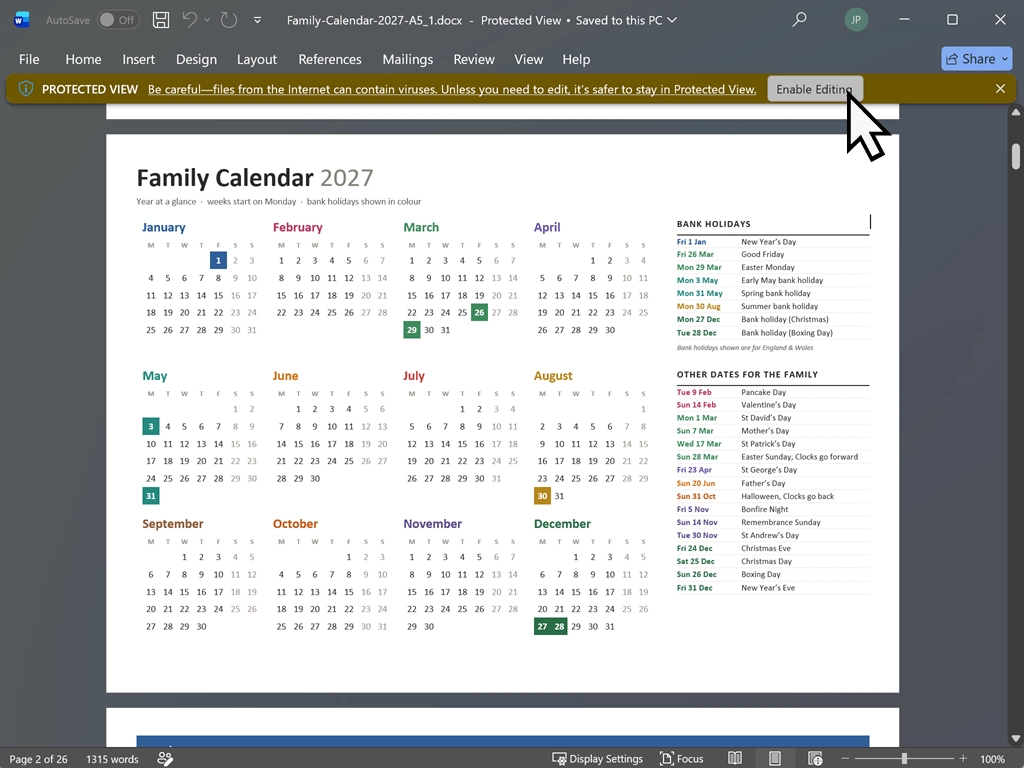
When you first open the file, you’ll probably see a yellow bar across the top saying Protected View. That’s normal for anything downloaded from the internet. Click Enable Editing and you’re ready to go.
Filling In the Word Version
- Click inside a day box and start typing.
- The boxes stay the same size, so the page never gets knocked out of shape. If you type more than fits, the extra text is hidden rather than lost. Make the text a bit smaller and it’ll reappear.
- For birthdays, notes and the to-do list, click on a line and type.
Filling In the Excel Version
- Each month has its own tab along the bottom of the window.
- Under each date there are two to four empty rows. Click a row and type, one entry per row.
- If an entry is too long for the box, it shrinks to fit instead of spilling into the next day.
Filling In the PowerPoint Version
- Every day is its own box. Click in it and type.
- You can drag boxes around, resize them, and change their colour with Shape Format > Shape Fill.
- If boxes are hard to click, open Home > Arrange > Selection Pane. Every box is listed by name, such as “March 26”.
Adding Your Own Cover
The first page is left blank on purpose. You can add a family photo with Insert > Pictures > This Device, type your family name across it, or print it blank and let the kids decorate it.
How to Print the Calendar
The main downloads are A4 landscape, so there’s nothing to set up. Open the file and print it.
Printing in Word or PowerPoint
Click File > Print, check the right printer is selected, then click Print. You’ll get all 14 pages, including the blank cover.
Printing in Excel
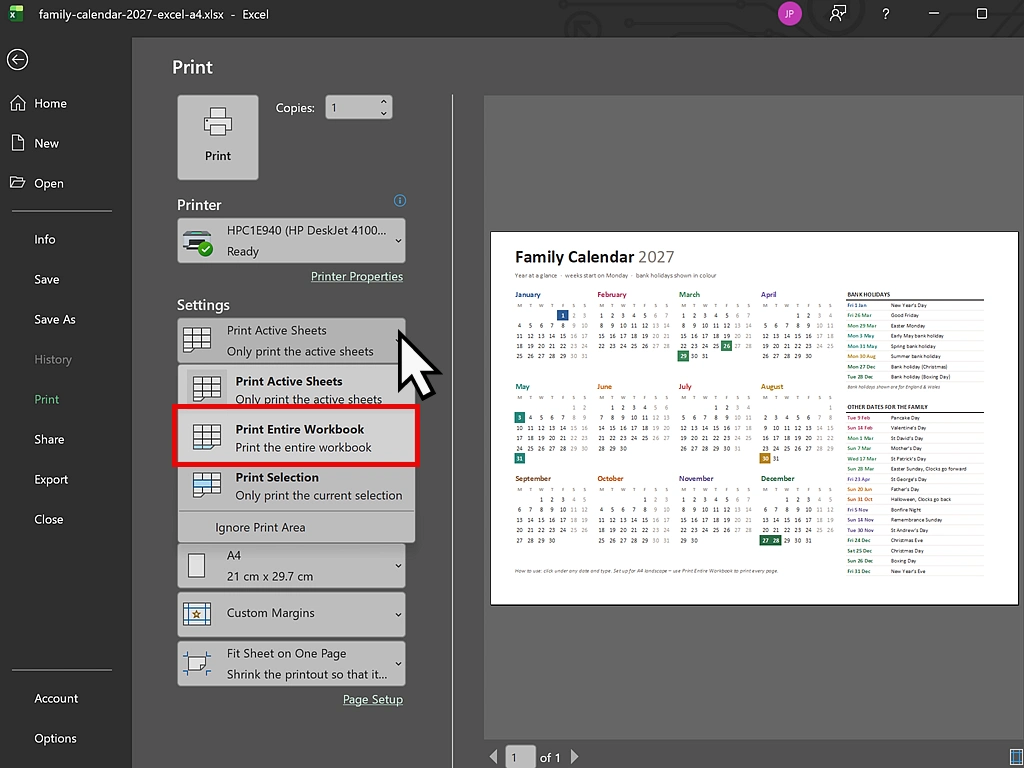
Excel only prints the tab you’re on unless you tell it otherwise, so there’s one extra step:
- Click File > Print.
- Under Settings, change Print Active Sheets to Print Entire Workbook.
- Click Print. You’ll get all 14 pages.
Printing the A5 Versions
The A5 files are already set up for A5 paper, so load A5 into your printer and print as normal. If you’ve only got A4 paper, download the A4 version instead. It’s exactly the same calendar, just bigger.
Printing Just One Month
You don’t have to print the whole year in one go. On the print screen in Word, type the page number in the Pages box. In PowerPoint, type it in the Slides box. January is page 3, February is page 4, and so on up to December on page 14. In Excel, click the month’s tab and print as normal, and Excel will print just that month.
Troubleshooting
I can’t type anything in the calendar. The file has opened in Protected View. Click Enable Editing in the yellow bar at the top.
Some of what I typed in Word has disappeared. The day box is full. Your text is still there, it’s just hidden below the bottom of the box. Make the text smaller or shorten it and it’ll come back.
Excel only printed one page. Excel prints the tab you’re on unless you tell it otherwise. On the print screen, change Print Active Sheets to Print Entire Workbook and print again.
The printout is small with a big white border. You’ve printed one of the A5 versions on A4 paper. Download the A4 version instead and it’ll fill the page.
The fonts look different from the pictures. The calendar uses Calibri, which comes with Microsoft Office. Other programs swap in a similar font, so the spacing can shift a little.
Nothing prints at all. If your printer won’t print anything from any program, the Windows print queue may be stuck. My print spooler guide shows you how to clear it.
FAQ
Q: Is the 2027 calendar really free?
A: Yes. There’s no sign-up, no email address needed and no watermark. It’s free for personal, family and classroom use.
Q: Do I need Microsoft Office to use it?
A: The files are made for Word, Excel and PowerPoint. If you don’t have Office, the free web versions at office.com will open them, and so will LibreOffice, although the layout may shift slightly. If you only want to print it and write on it by hand, download the PDF instead.
Q: Can I add my own photos to the calendar?
A: There isn’t room on this one, because the day boxes take up the page. If you want a picture on every month, use my photo calendar instead. It’s in my guide on how to make your own photo calendar.
(Link “how to make your own photo calendar” to https://athomecomputer.co.uk/how-to-make-a-photo-calendar/)
Q: Can I change the colours?
A: Yes. In Word, click in a box and use Table Design > Shading. In Excel, use the Fill Colour button on the Home tab. In PowerPoint, use Shape Format > Shape Fill.
Q: Does the calendar include Scottish and Northern Irish bank holidays?
A: The calendar shows the bank holidays for England and Wales. The extra dates for Scotland and Northern Ireland are listed on this page, so you can type them in yourself.
Q: Does the week start on Monday?
A: Yes, every month starts on Monday, the way most UK calendars do.
Q: What size is the calendar?
A: The main downloads are A4 landscape, which suits most home printers. There are A5 versions too, linked just below the download buttons.
Q: Will there be a 2028 calendar?
A: Yes. Sign up to the newsletter at the bottom of this page and you’ll get it as soon as it’s ready.
Summary
That’s it: a free 2027 family calendar you can type into, print on A4 or A5, and stick on the fridge. If you’re not sure which version to get, download the Word one, add your own cover, and get the birthdays in before you forget them.
If you’d rather have a photo of the family on every month, have a look at my guide on how to make your own photo calendar. It makes a lovely Christmas present for the grandparents.
Want next year’s calendar? I’ll be making a 2028 version, and newsletter subscribers will be the first to get it. Pop your email in below and I’ll let you know as soon as it’s ready.