
Ask most golfers whether they are improving and they will tell you about their best round. That is not much help, because the best round is the one you remember.
Arccos, who track millions of real rounds, found that the average golfer’s best and worst round in a single year are about 17 shots apart. One round, brilliant or awful, tells you almost nothing about how you are playing.
What does tell you something is your last ten rounds compared with the ten before them. That is what this golf score tracker does. You type in four things after each round, and it works out whether you are genuinely getting better or just remembering the good days.
It is free, it is already built, and you do not need to know anything about spreadsheets to use it. You fill it in, that is all.
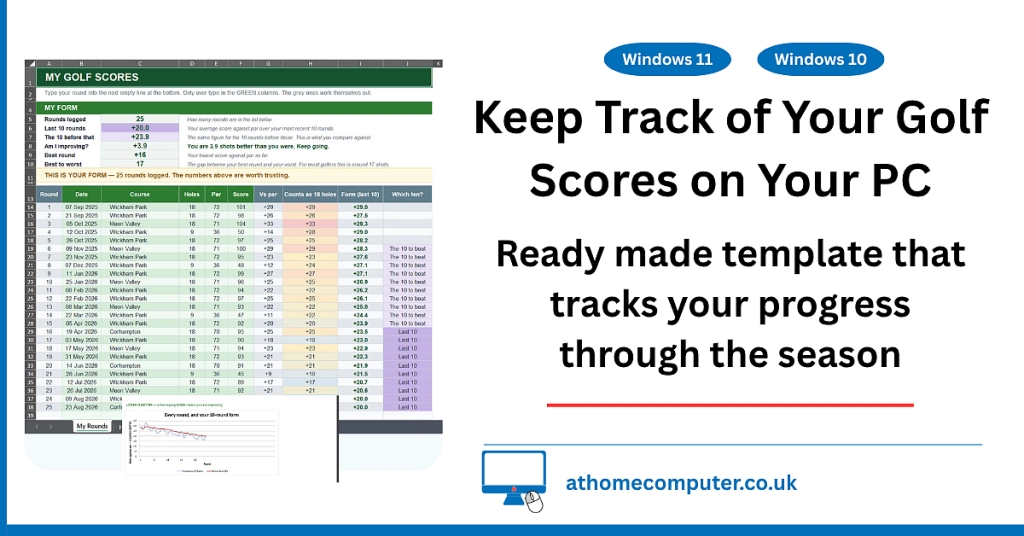
Table of contents
- What the Golf Score Tracker Actually Does
- Get Your Copy of the Tracker
- What You Get When You Open It
- Filling In Your First Round
- What Fills Itself In
- The Score to Beat at Every Course You Play
- What It Looks Like After a Season
- Using the Tracker on Your Phone at the Course
- This Is Not an Official Golf Handicap
- Troubleshooting
- Frequently Asked Questions
- How the Tracker Works It Out
- Summary
What the Golf Score Tracker Actually Does
After every round you type in four things. The date, the course, the par of the course, and your score. Everything else works itself out.
At the top of the sheet you get:
- Rounds logged. How many are in your golf round log so far.
- Last 10 rounds. Your average score against par over your most recent ten.
- The 10 before that. The same figure for the ten before those.
- Am I improving? The difference between the two, in plain English. Something like “You are 3.9 shots better than you were.”
- Best round. Your lowest score against par so far.
Underneath that is a table showing how you play each course, and the score you need to beat next time you play there. Everything else on the sheet exists to make those numbers honest.
It handles eighteen hole rounds. There is more on why further down.
Get Your Copy of the Tracker
There are two versions. They do exactly the same job, so pick whichever suits you. Both are free and neither asks for anything in return.
The Google Sheets Version, Which I Would Recommend
Nothing to download and nothing to install. Click the link, click the button that appears, and your own copy lands in your Google Drive.
Make your copy of the Golf Score Tracker
When you click it, Google asks “Would you like to make a copy?” Click Make a copy and that is it. The copy is yours. You can type in it, rename it and change it however you like, and nothing you do affects my original.
You will need a Google account. If you do not have one, I have a guide on how to create a Google account, and it takes about five minutes.
The reason I would pick this one is the phone. Your scores are on your computer at home and in your pocket at the course, without you doing anything to make that happen.
The Excel Version
If you would rather have a file sitting on your own PC, or you do not want a Google account, download the golf score spreadsheet instead.
Download the Golf Score Tracker for Excel (.xlsx)
It opens in Excel, and it also opens in the free spreadsheet apps such as LibreOffice Calc and WPS Office. I have tested it in Excel 2016, 2019 and 2021. If you are not sure where the file went after you clicked, my guide on downloading files from the internet covers the Downloads folder and how to find things in it.
Quick Tip
When you open the downloaded file, Excel will probably show a yellow bar across the top saying Protected View. That is normal for anything that came from the internet and it is not a warning about my file. Click Enable Editing on that bar, otherwise you will not be able to type anything in.
What You Get When You Open It
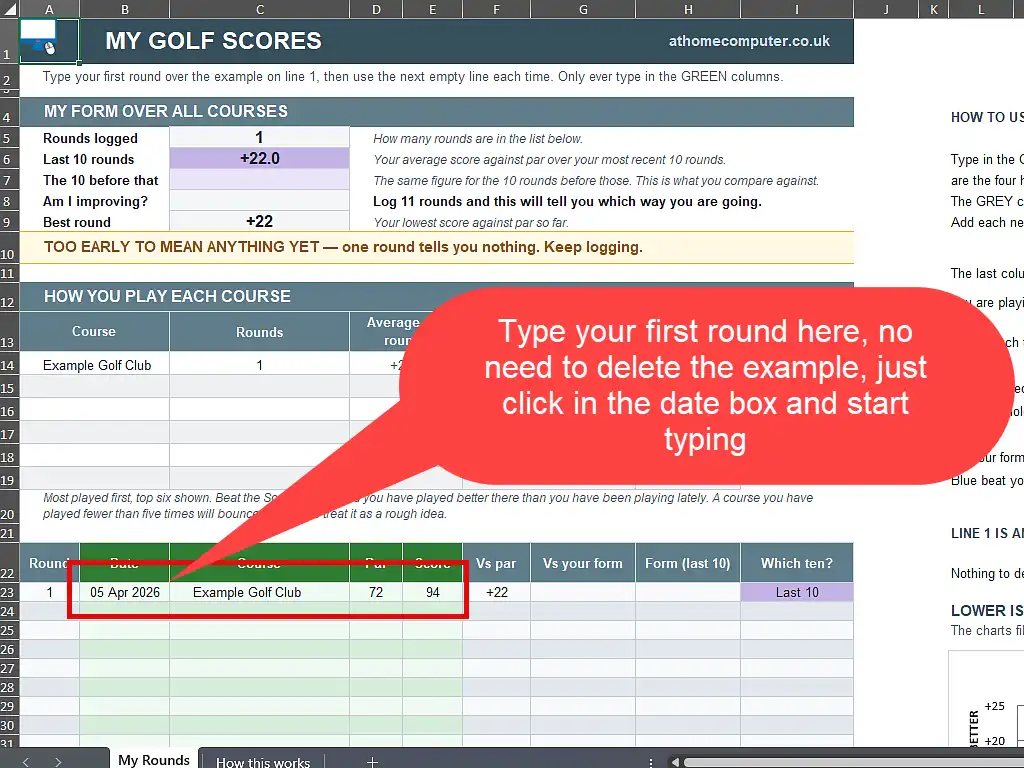
The sheet arrives ready to go. There is nothing to set up and nothing to delete. Line 1 holds a single example round, played at “Example Golf Club”, and all you do is type your own round straight over it.
That example is there on purpose. It shows you what belongs in each box before you type anything, and it gives the charts something to draw so you can see the sheet working from the first second.
The only part you ever type in is the green columns. Everything grey fills itself in. That is worth remembering, because it is the one rule that keeps the sheet working.
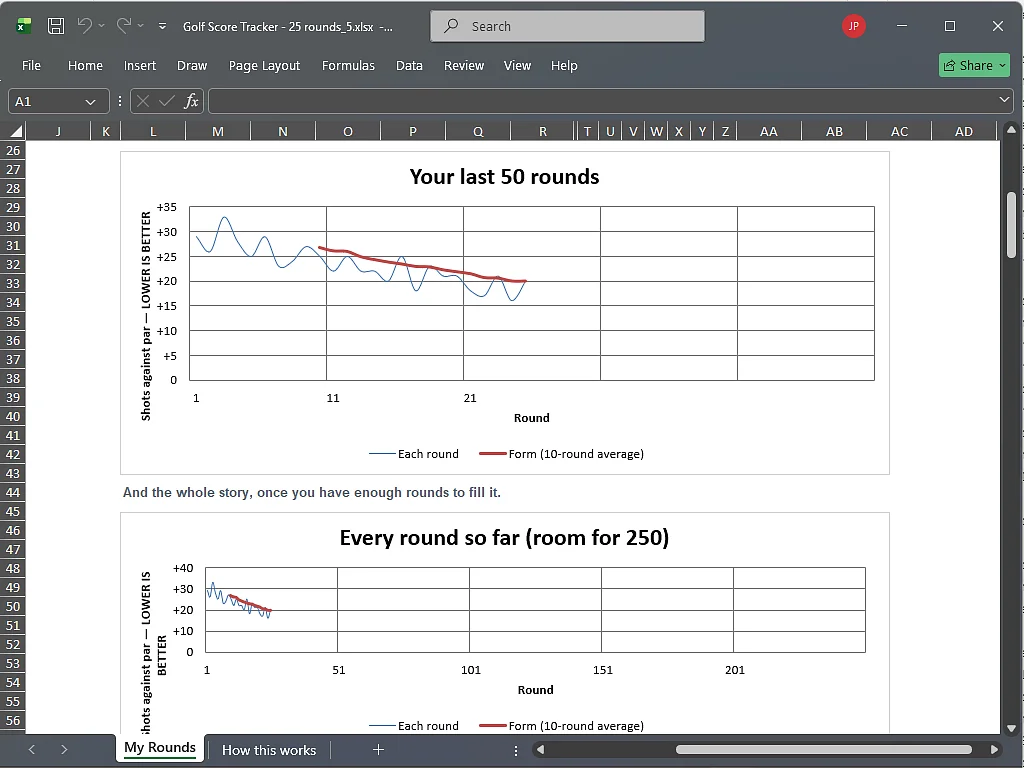
Down the right hand side there are instructions, and underneath those, two charts. They will look bare at first, because one round is not much to draw. They fill out as you play, and the thick red form line joins in at round ten.
Filling In Your First Round
Scroll down to the bottom table headed Round, Date, Course, this is the scorecard and it’s the only part you need to fill in. Work along line 1, typing over the example as you go. Click a box, type, press Tab (or right arrow key) to move along.
- Date. The day you played.
- Course. Whatever you call it. Nobody sees this but you. But try to be consistent with the name of the course.
- Par. The par of the course you played, normally 70 to 72. It is printed on the scorecard.
- Score. Your total number of shots. Just the number, so 94, not “94 shots” and not “+22”.
Press Enter and the rest of the row fills in on its own. That is the whole job, and it takes about ten seconds.
Next time you play, use the next empty row down. Keep going down the sheet in order and do not leave blank rows between rounds. If you do, the sheet will tell you, in so many words, that there is a gap and the figures are wrong until you close it.
For example
You go round a course with a par of 72 and take 94 shots. You type 72 and 94. The sheet fills in +22, because 94 is twenty two shots more than par. That +22 is the number it actually tracks, not the 94, and it is why scores from different courses can sit in the same list.
Quick Tip
Once you have a lot of rounds in, scrolling to the bottom every week gets tiresome. Click any cell in the Score column, then hold Ctrl and press the down arrow. You land on your last score. One more press of the down arrow and you are on the empty row, ready to type. Ctrl and the up arrow takes you back to the top.
What Fills Itself In
After a handful of rounds the grey columns start doing their work. Reading across your row:
- Vs par. How many shots over or under par that round was. Shoot 94 on a par 72 and this reads +22.
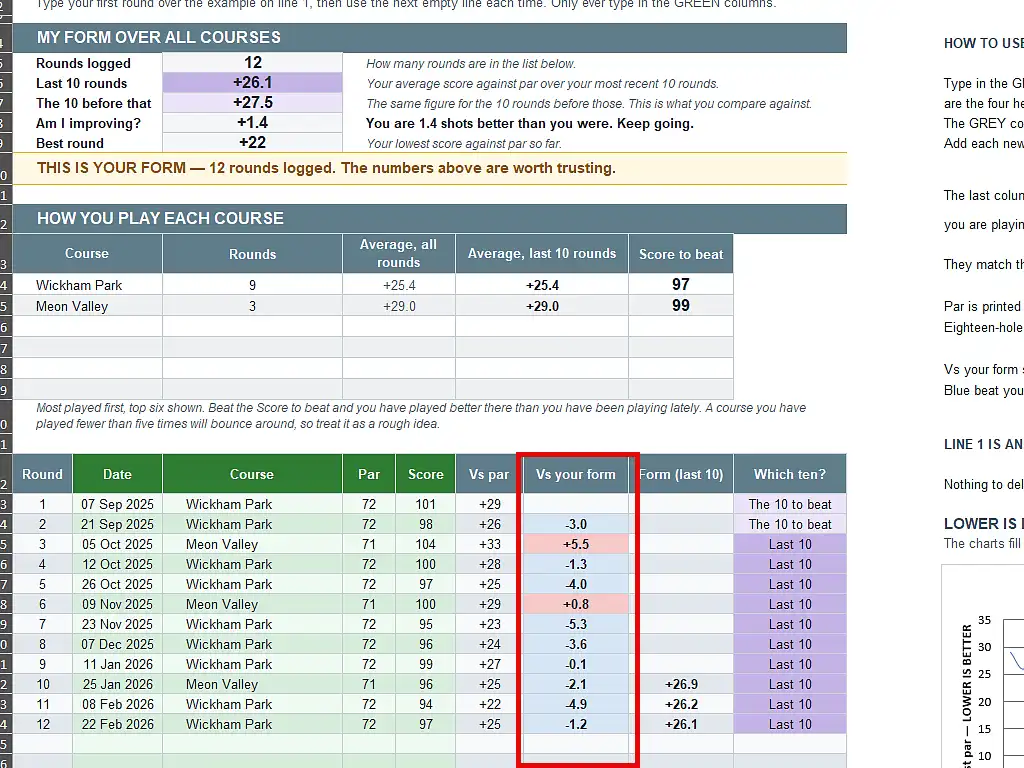
- Vs your form. How that round compared with the ten rounds before it. This is the coloured one, and there is more on it below.
- Form (last 10). Your rolling ten round average. It stays empty until you have ten rounds, because until then there is no ten round average to show.
- Which ten? Says whether that round is in the ten being counted now, or the ten you are being measured against.
At the top, the yellow line tells you how much to trust the figures. Under five rounds it says so plainly. Between five and nine it counts down how many more you need. From ten onwards it tells you the numbers are worth trusting.
I would rather the sheet said it does not know yet than show you a confident number built on two rounds.
Vs Your Form, and What the Colours Mean
Vs par tells you how you did against the course. Vs your form tells you how you did against yourself, which is the question you actually ask walking off the last green. Was that a good one, for me?
- Blue. You beat the form you took to the first tee.
- Yellow. You matched it exactly.
- Red. You fell short of it.
It compares each round with the ten rounds before it, so a row never changes later. A good round stays a good round even after you have improved past it.
The Score to Beat at Every Course You Play
This is the part I would carry to the course.
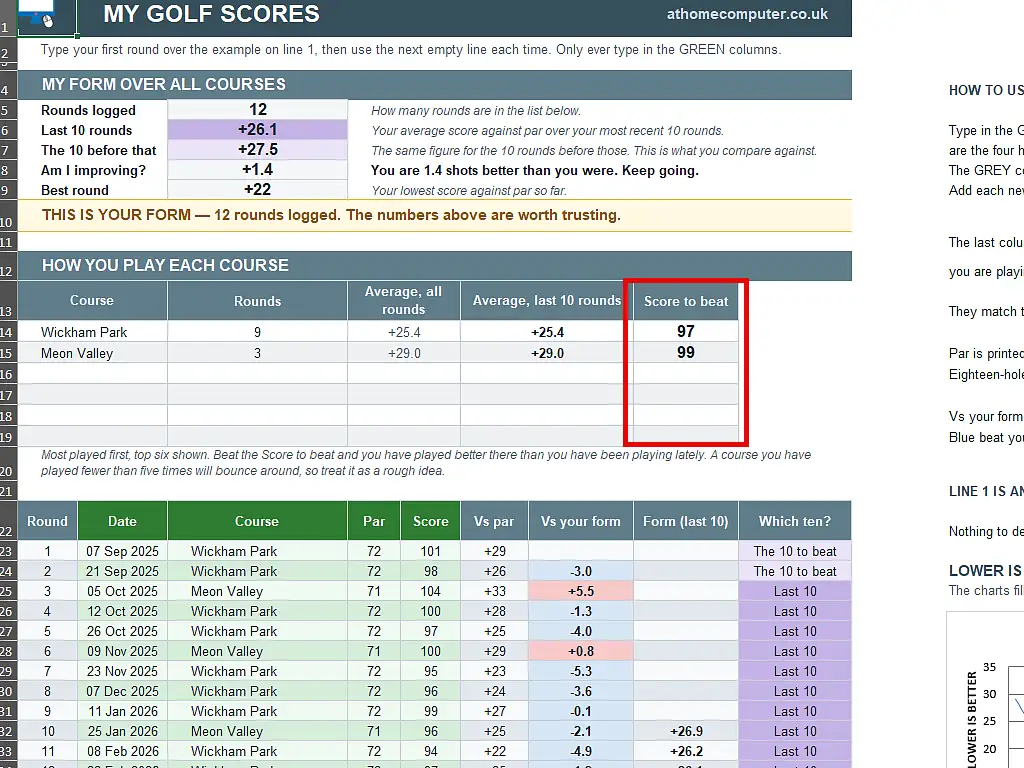
Under the main figures there is a table listing every course you have played, most played first. For each one it shows how many rounds you have logged there, your average over all of them, your average over the last ten there, and a score to beat.
The score to beat is a real number, on that course, that would be better than you have been playing there lately. Play a par 72 course where your last ten rounds average +20.6, and the sheet tells you to beat 92. One number, and you can hold it in your head all the way round.
It is worked out from your last ten rounds at that course, not your all time average, and that matters more than it sounds. If you have been improving, your all time average is dragged up by rounds you played a year ago, and a target built on it is one you would beat most weeks without trying. Showing both averages side by side is the point. Where the two differ, you are getting better.
A course you have played fewer than five times will bounce around, so treat those as a rough idea rather than a target.
What It Looks Like After a Season
Twenty five rounds in, everything is working and the two charts start earning their place.
The top chart shows your last fifty rounds. The thin line is every round, bouncing around the way golf does. The thick line is your form, and that is the one to watch. Lower is better, so a line sloping downwards means you are improving. There is a divider every ten rounds so you can see how much of the chart ten rounds actually is.
The chart moves along with you. Once you pass fifty rounds it shows your most recent fifty rather than your first fifty, so it never squashes into a corner.
Underneath it is a second chart covering every round the sheet can hold, all 250 of them. That one is nearly empty for a long time, and that is the point. It is for looking back after a few years.
Using the Tracker on Your Phone at the Course
This is where the Google Sheets version earns its keep. Fill your card in on the phone in the car park and it is on your computer before you get home.
- Install the free Google Sheets app from the App Store or the Play Store.
- Sign in with the same Google account you used to make your copy.
- Your tracker is already there in the list, because it is in your Drive.
- Open it, scroll to the first empty row and type your round in.
There is nothing to sync and no button to press. It is the same file, so a round you add on the phone is on the PC when you open it, and the other way round.
Quick Tip
Golf clubs are not famous for their phone signal. In the Google Sheets app, open the menu on your tracker and turn on Available offline. You can then fill it in with no signal at all and it catches up by itself the moment you are back in range.
If you went for the Excel version, the file lives on that one PC. You can still put it in OneDrive or Dropbox and reach it from a phone, but the Sheets version does it without you setting anything up.
This Is Not an Official Golf Handicap
I want to be completely clear about this one, because somebody will otherwise turn up at a golf club with a number they worked out at their kitchen table.
The number this sheet gives you is not a handicap. It is a personal progress tracker. An official Handicap Index comes from a club or from a body such as England Golf, and it is worked out in a completely different way.
It is fine to use it as an informal handicap among friends, and that is genuinely useful if you and your mates play together but none of you are club members. A society handicap worked out this way is better than guessing. Just do not present it as anything official, and do not enter a competition with it.
If you want the real thing, joining a club is the usual route, and there are pay as you go schemes for people who do not want a full membership.
Troubleshooting
It Will Not Let Me Type My Score In
The sheet only accepts a plain number in the Score and Par boxes. If you have typed anything else, a little message appears explaining what it wants. Type 94, not 94 shots and not +22.
Nothing Happens When I Type
If you opened the Excel version, look for a yellow bar across the top of the window saying Protected View, and click Enable Editing. Until you do, Excel will not let you change anything. It does this with every file that came from the internet.
It Says There Is a Blank Row in My Log
You have left an empty row somewhere between two rounds, usually by starting a new round further down than you meant to. Scroll down the list, find the gap, delete the empty row so the rounds close up, and the message goes away by itself.
Worth doing rather than ignoring. Until the gap is closed, the comparison between your last ten rounds and the ten before them is reading the wrong rows.
It Says My Rounds Are Not in Date Order
Something has shuffled the list, usually a sort. The sheet reads your rounds in the order they sit on the page, so oldest needs to be at the top and newest at the bottom. Put them back in that order and the warning clears.
I Downloaded It But I Cannot Find It
It will be in your Downloads folder. Open File Explorer and click Downloads in the list down the left hand side. The newest file is usually at the top.
I Have Run Out of Rows
The sheet holds 250 rounds, which is three or four years for most people. It warns you when you are ten rows from the end. When you get there, start a fresh copy and bring your last twenty rounds across, and everything carries on working straight away.
Frequently Asked Questions
Q. Can I log nine-hole rounds?
A. Not in this version, and that is deliberate. An earlier one accepted them and doubled the score, but a doubled nine bounces around noticeably more than a real eighteen, and that noise worked its way into every figure on the sheet. Leaving nines out means every number means exactly what it says. If you play a lot of nines, log your eighteens and you will still get a proper picture, just from fewer rounds.
Q. Do I need a Google account to use the tracker?
A. Only for the Google Sheets version. The Excel download does not need an account of any kind. If you want the Sheets version and do not have an account, it takes about five minutes to set one up and it is free.
Q. Is it really free, and will you email me?
A. It is free and there is nothing to sign up for. Click the link and the file is yours. I am not asking for your email address to hand it over.
Q. How many rounds do I need before it means anything?
A. Ten. Below five the sheet says so plainly, between five and nine it treats the figure as a rough guide, and from ten onwards it tells you the numbers are worth trusting. Ten is the point where a golf score tracker stops being noise, and adding many more than that improves it only slightly.
Q. What is the round at “Example Golf Club” on line 1?
A. An example, put there to show you what goes in each box. Type your own round straight over it. There is no need to delete anything, and it disappears the moment you do.
Q. Why is the Form column empty for my first nine rounds?
A. Because it is a ten round average, and until you have ten rounds there is not one to show. It fills in on your tenth round, and the red line on the chart starts at the same moment.
Q. Does it work for Stableford points?
A. Not yet. This version handles gross scores, the plain total number of shots. A Stableford version is on my list.
Q. Can I use it on a Mac or a Chromebook?
A. Yes. The Google Sheets version works in any web browser on any machine. The Excel file opens in Numbers on a Mac, although a couple of the colours may look slightly different.
Q. Can I share it with the lads I play with?
A. Please do, but send them to this page rather than sending them your own copy. That way they get a clean one, and they get whatever the latest version is. Each person needs their own copy, because it tracks one player.
Q. I play the same course every week. Does that matter?
A. It actually makes your figures more reliable, not less. The sheet compares your score with the par of the course, which handles most of the difference between courses but not all of it. Playing the same course removes that problem completely.
Q. Can I use this as my golf handicap?
A. Not as an official one. It is fine as an informal handicap among friends, and useful if none of you are club members, but an official Handicap Index has to come from a club or a body such as England Golf.
How the Tracker Works It Out
You do not need any of this to use the sheet. It is here for anyone who wants to know why it does what it does.
Why Ten Rounds?
Averaging rounds cancels out the noise, but there is a point where adding more stops helping much. Roughly how far your average might be from the truth:
- 5 rounds, about 1.3 shots out
- 10 rounds, about 0.9 shots out
- 20 rounds, about 0.7 shots out
- 30 rounds, about 0.5 shots out
Going from five rounds to ten tightens the figure by nearly a third. Going from ten to twenty tightens it by the same again, but costs you twice as many rounds to get there. Ten is where you get most of the benefit for the least waiting, which is why the sheet uses it.
Why It Is Not Built Like a Real Handicap
Here is the part that surprises people. Under the World Handicap System, your handicap is not the average of your rounds.
You need 54 holes to get started, which is three eighteen hole rounds, six nine hole rounds, or a mix. But once you have twenty scores on record, the system takes the best eight of those twenty and averages only those. It throws the other twelve away.
That is deliberate. A handicap answers the question “how well can this person play when it all goes right?”, so that two strangers can have a fair match. It is a fairness device, not a report card.
This tracker asks a different question, “am I getting better?”, and for that you need your typical round rather than your best one. So it averages everything in the window and keeps your bad days in. Those are the days that show whether you are actually improving.
The One Thing the Sheet Cannot Do
It compares you against par, not against how hard each course actually is. A par 72 at a gentle parkland course and a par 72 on a windswept links are not the same test, and the official system uses a course rating and a slope rating to handle exactly that.
I left those out on purpose. They are two more numbers to find and type in for every single round, and for tracking your own progress they change very little. If you play one or two courses regularly, this barely matters at all. The more you mix very different courses, the rougher your form number becomes.
Summary
Your memory of your own golf is not reliable. The best round sticks and the rest fade, which is why almost everybody thinks they are playing better or worse than they really are.
Ten seconds of typing after each round fixes that. Ten rounds in, the sheet will tell you in plain English whether you are getting better, and by how many shots, and give you a number to beat next time you play.
Take a copy, put it on your phone, and start with your next round.