
Gmail has its own address book, which Google calls your contacts. It’s where the names, email addresses and phone numbers of the people you email are kept, so you don’t have to remember them or type them out every time.
In this guide I’ll show you where to find your contacts, how to add new ones, how to save an email address straight from an email, and how to edit or delete a contact when someone’s details change.
Where Are My Contacts in Gmail?
There are two ways to get to your contacts. You can open them in a narrow panel on the right of Gmail, which is handy for a quick look, or you can open Google Contacts full size in its own tab. Both show the same list.
Open Contacts From the Gmail Side Panel
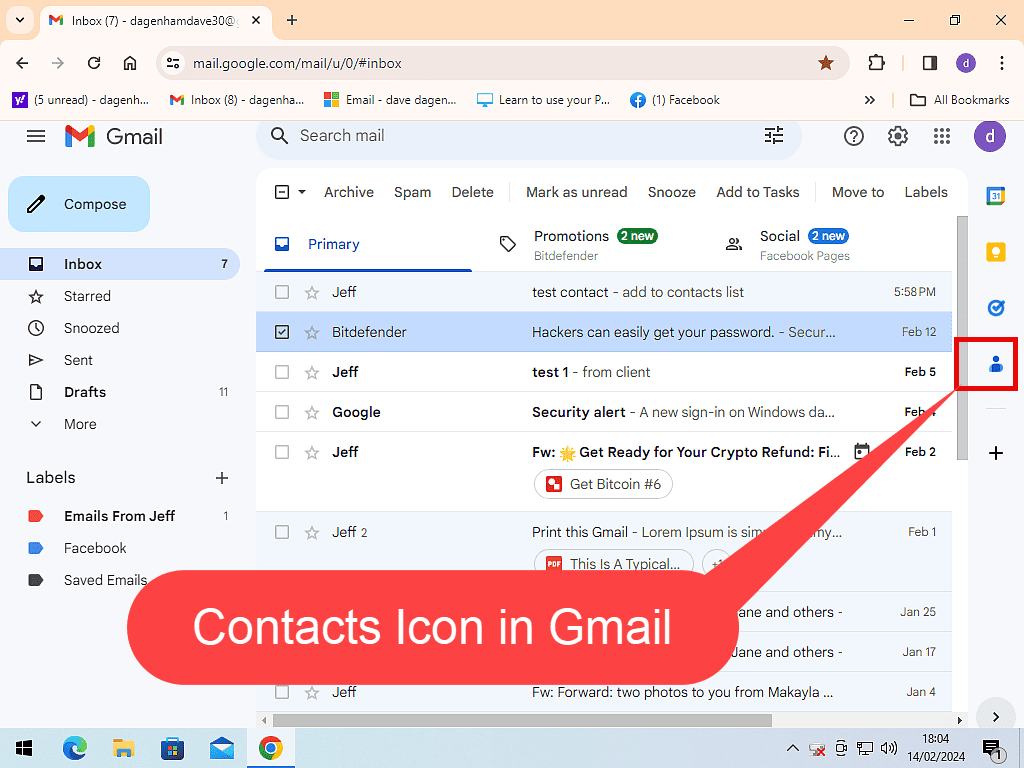
With Gmail open, look at the thin panel down the right-hand side of the window. Click the Contacts icon and your contacts list will open in the panel.
If You Can’t See the Side Panel
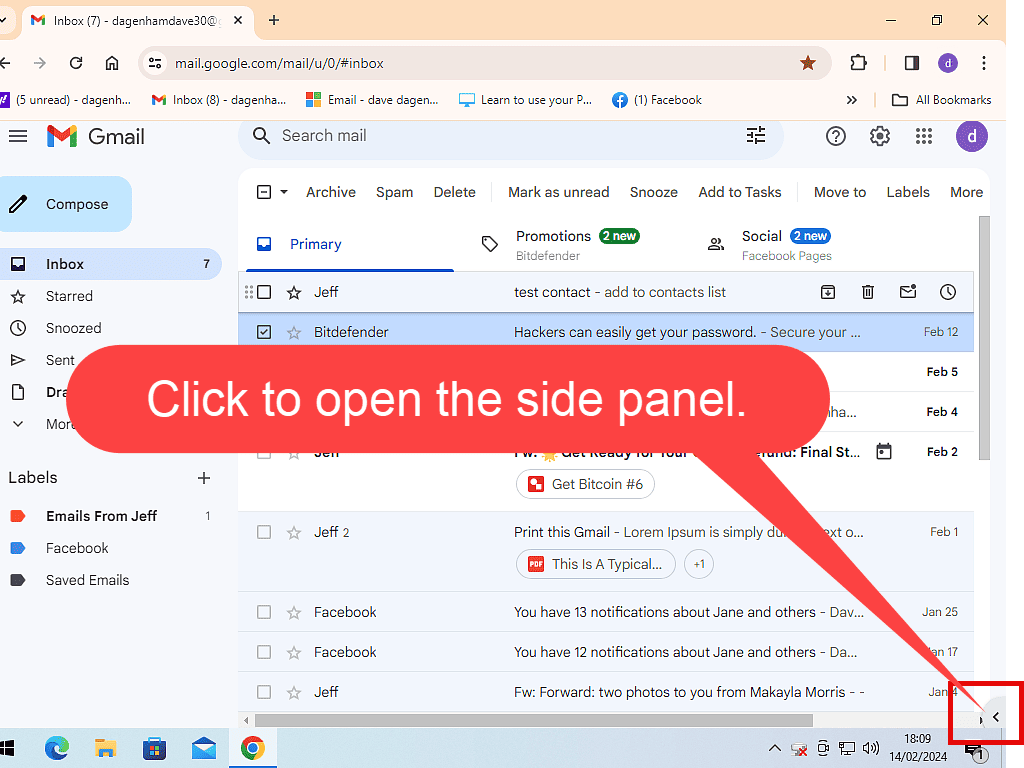
If there’s no panel on the right, it’s been hidden at some point. To bring it back, click the small Show side panel arrow in the bottom right-hand corner of the Gmail window. It’s tiny, so you might have to look closely, but it is there.
Open Google Contacts in Its Own Tab
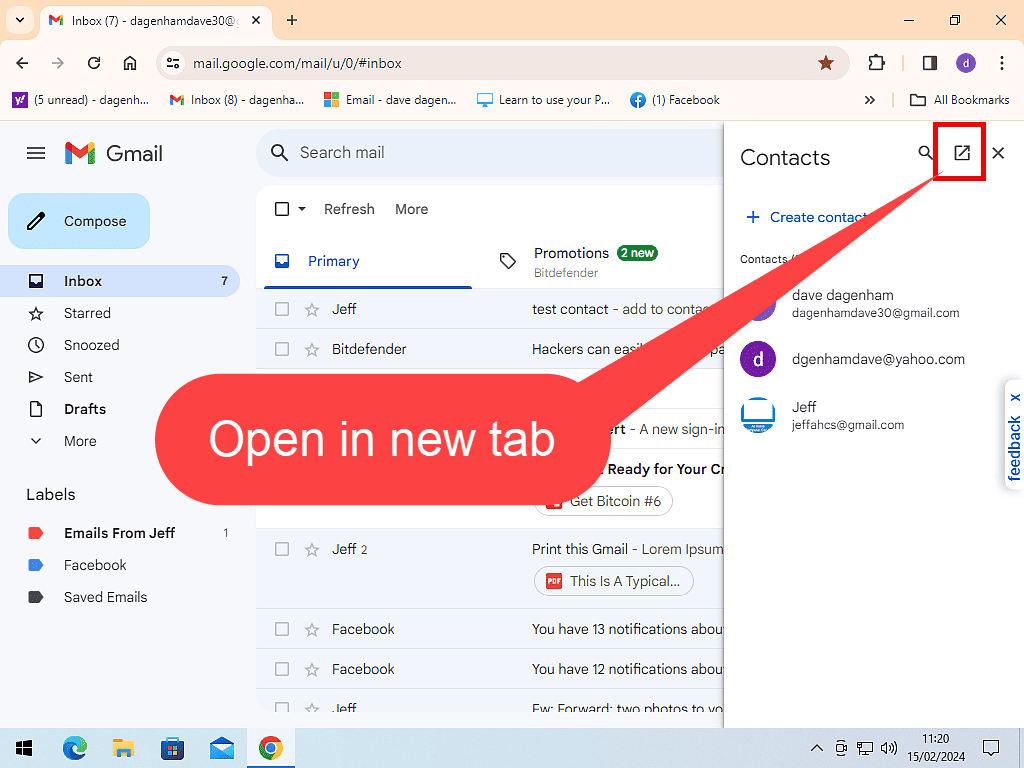
The side panel is fine for a quick look, but it’s a bit cramped for anything else. To open your contacts full size, click the Open in new tab icon at the top of the contacts panel. You can also go straight to contacts.google.com, or click the Google apps icon (the nine dots at the top right of Gmail) and choose Contacts.
How to Add a New Contact in Gmail
- Open your contacts, either in the side panel or in Google Contacts.
- Click Create contact.
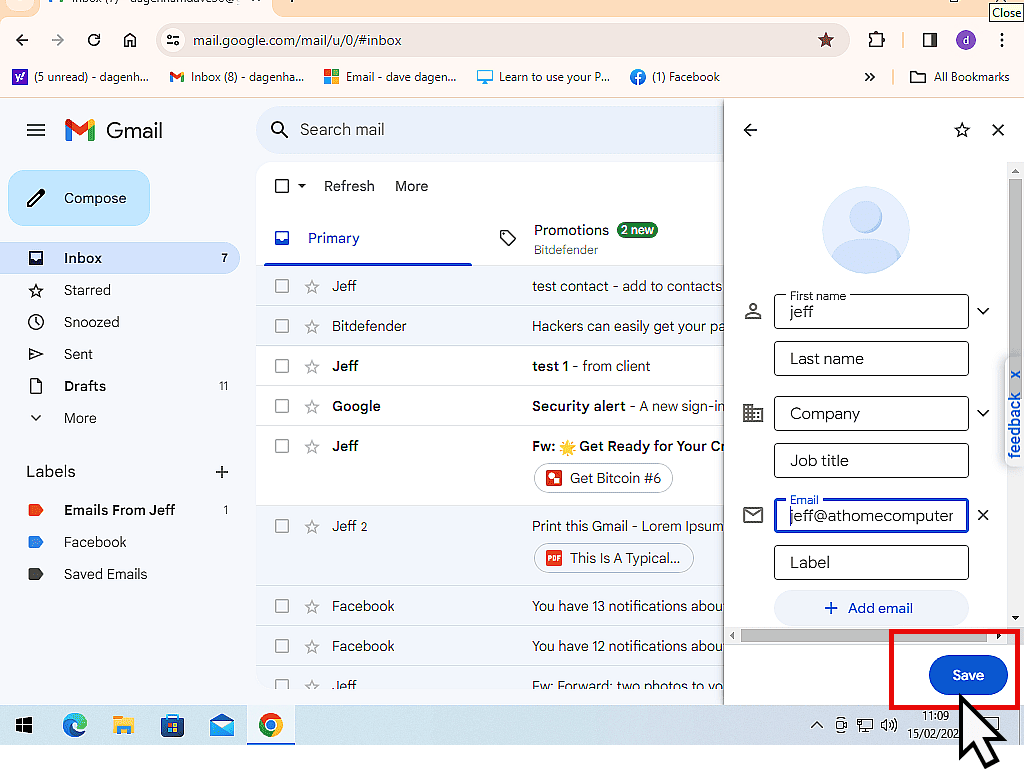
- Type in the person’s name, email address and any other details you want to keep.
- Click Save.
You don’t have to fill in every box. Leave blank anything you don’t know, and you can always come back and add it later. Since this is Gmail, though, you’ll almost certainly want to add an email address.
Moving over from Yahoo Mail? You don’t need to type all your contacts in again. How to Transfer Yahoo Mail to Gmail shows how to bring your emails and contacts across in one go.
How to Save an Email Address From an Email
The quickest way to add someone is straight from an email they’ve sent you, because Gmail already knows their name and address.
- Open the email.
- Point your mouse at the sender’s name at the top of the email. A small card with their details will pop up.
- Click the Add to contacts icon on the card. It looks like a little person with a plus sign.
They’re now saved in your contacts. If you want to add a phone number or anything else, you can edit the contact afterwards.
How to Edit a Contact in Gmail
People change their email address, move house or get a new phone number, so from time to time you’ll need to update their details.
- Open your contacts and click on the person you want to change.
- Click the Edit contact icon. It looks like a pencil.
- Make your changes.
- Click Save.
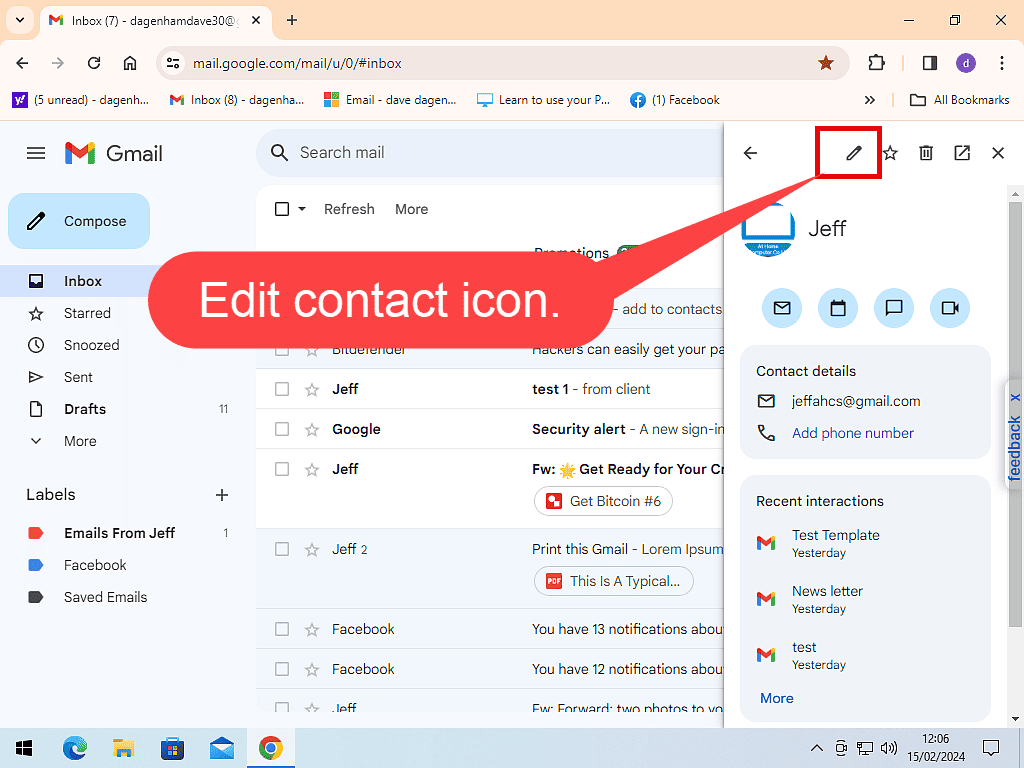
Some details, like a person’s profile photo, come from their own Google account. You can’t change those, but you can add your own notes and extra details alongside them.
How to Delete a Contact
Open the contact, click the More actions icon (three dots) and click Delete. Then click Move to trash to confirm.
Deleted someone by mistake? Deleted contacts go into the Trash in Google Contacts and stay there for 30 days. Open Google Contacts, click Trash in the left-hand menu, tick the contact and click Recover.
What Are Other Contacts in Gmail?
Whenever you send an email or reply to one, Gmail quietly saves that person’s email address in a separate list called Other contacts. That’s why their address pops up when you start typing their name, even though you never added them.
Other contacts don’t appear in your main contacts list. To see them, open Google Contacts full size and click Other contacts in the left-hand menu.
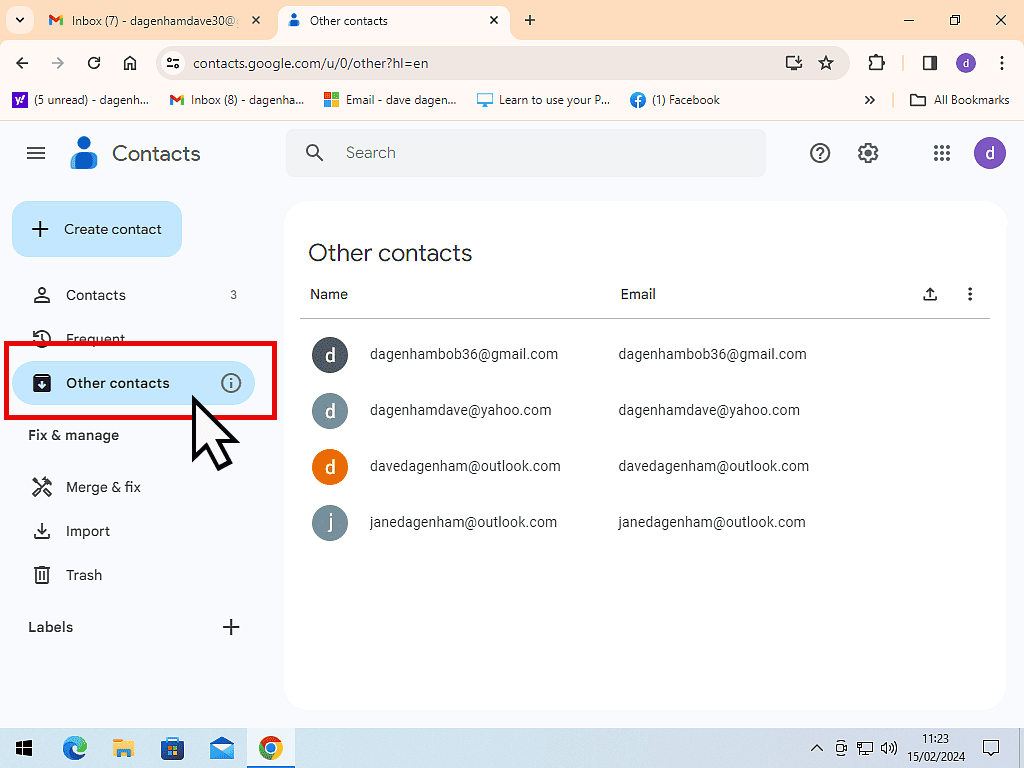
Move Someone From Other Contacts to Your Contacts
Point your mouse at the person in the Other contacts list and click the Add to contacts icon that appears on the right. The icon only shows when your mouse pointer is over the entry.
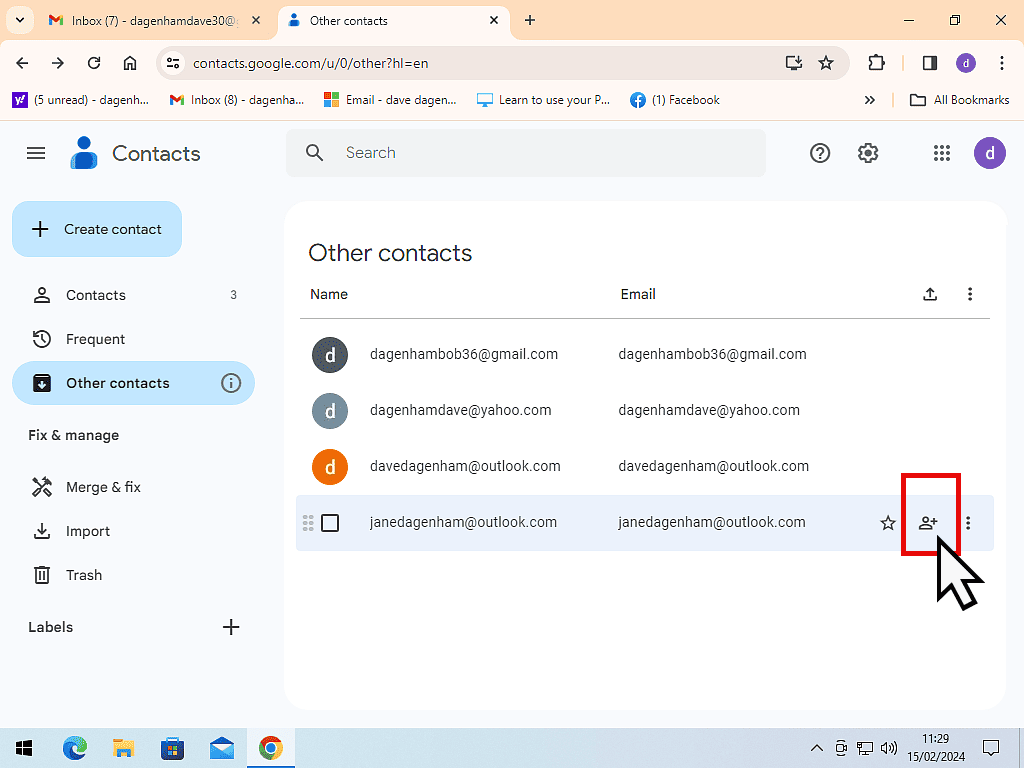
Stop Gmail Saving Addresses Automatically
If you’d rather Gmail didn’t save everyone you email, click the Settings icon (the gear wheel) at the top right of Gmail and click See all settings. On the General tab, find Create contacts for auto-complete and choose I’ll add contacts myself. Then scroll to the bottom and click Save Changes.
How to Merge Duplicate Contacts
If you’ve been using Gmail for years, you’ll probably have a few people saved more than once. Google Contacts can find and tidy these up for you.
- Open Google Contacts full size.
- Click Merge & fix in the left-hand menu.
- Check the suggestions, then click Merge on each one, or Merge all to do them all at once.
Troubleshooting
I Can’t See the Contacts Icon
The side panel is probably hidden. Click the small Show side panel arrow in the bottom right-hand corner of Gmail. If you still can’t find it, go to contacts.google.com instead.
A Contact Doesn’t Show Up When I Type Their Name
Check these:
- Are you signed in to the right account? If you have more than one Gmail account, each one has its own contacts.
- Have you turned off auto-complete? If you chose I’ll add contacts myself, people you email aren’t saved in Other contacts any more, so you’ll need to add them yourself.
- Is there a spelling mistake? Open the contact and check the name and email address.
My Changes Aren’t Showing on My Phone
Your phone needs to be signed in to the same Google account, with contacts syncing turned on. On most Android phones that’s already set up. On an iPhone, it’s in the phone’s Settings under your Gmail account.
Frequently Asked Questions
Q: Where is the address book in Gmail?
A: Gmail calls it Contacts. Click the Contacts icon in the side panel on the right of Gmail, or go to contacts.google.com to see it full size.
Q: What’s the difference between Contacts and Other contacts?
A: Contacts are the people you’ve saved yourself. Other contacts are email addresses Gmail saves automatically whenever you email or reply to someone. Only the people you’ve saved appear in your main contacts list.
Q: Will my Gmail contacts show on my phone?
A: Yes, as long as your phone is signed in to the same Google account and contacts syncing is turned on. Changes you make on your computer then show on your phone, and the other way round.
Q: Can I get a deleted contact back?
A: Yes, for 30 days. Open Google Contacts, click Trash in the left-hand menu, tick the contact and click Recover. You can also use Undo changes in Google Contacts settings to put your whole contacts list back to how it was at any point in the last 30 days.
Q: Can I bring my contacts over from Yahoo or Outlook?
A: Yes. Export your contacts from your old email account as a file, then use Import in Google Contacts. If you’re moving from Yahoo, How to Transfer Yahoo Mail to Gmail covers it step by step.
(link that title to https://athomecomputer.co.uk/move-yahoo-mail-to-gmail/)
Summary
Your Gmail contacts are really your Google contacts, and you can reach them from the side panel in Gmail or full size at contacts.google.com. Adding someone takes a few seconds, especially if you save them straight from an email they’ve sent you.
It’s worth keeping your contacts up to date, because they follow you to your phone and anywhere else you sign in with your Google account. If you haven’t got one yet, see How To Create A Google Account.
Gmail is Switching Off Gmailify and Check Email From Other Accounts
Nothing has been switched off yet but if you have emails from different services, such as Yahoo, Outlook etc, sent to your Gmail account, you need to check this.
You can find this and other related step by step guides in – At Home Computer Gmail Guides
Written by Jeff Porter. I’ve been fixing Windows PCs since 2010 and I’m CompTIA Network+ certified. More about me