
Do your BT, Yahoo, Hotmail or other emails turn up in your Gmail inbox? In January 2027 that stops. Google is switching off the two Gmail settings that make it happen, Gmailify and Check email from other accounts.
Sending emails from your other address inside Gmail is going at the same time.
Nothing has been switched off yet, so there’s time to sort it out. I’ll show you how to check whether it affects you, and the free ways to keep getting your emails. You don’t need to buy anything.
The Short Version
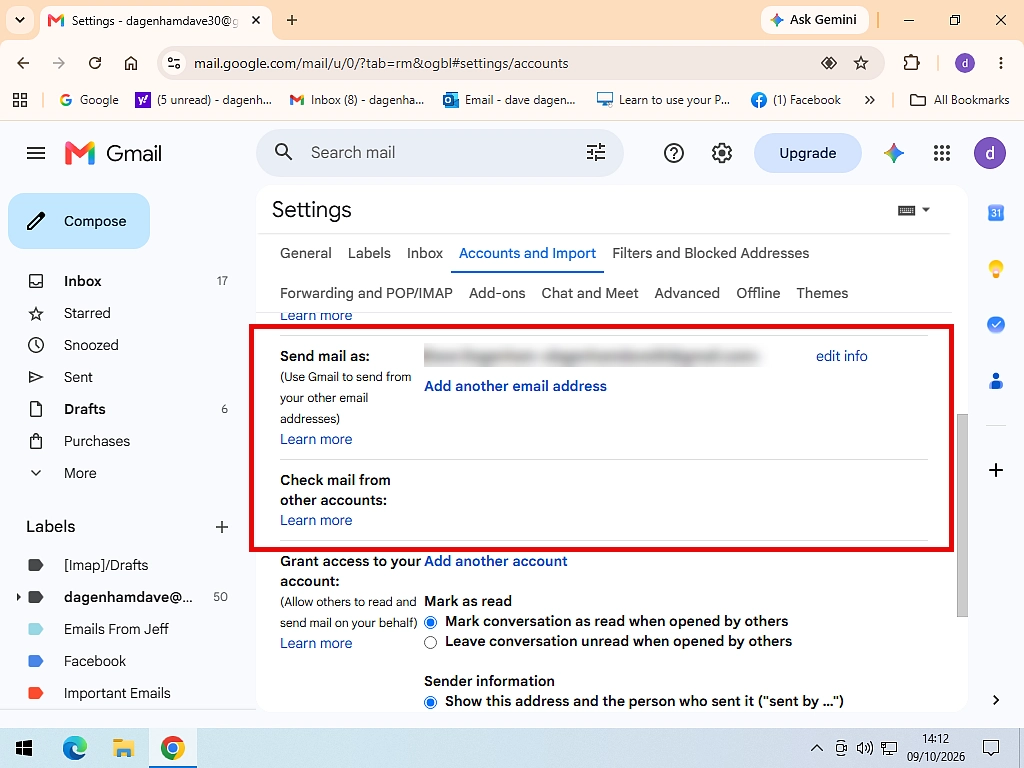
- In Gmail, go to Settings, See all settings, Accounts and Import. If another email address is listed under Check email from other accounts or Send mail as, this affects you.
- If your other email provider can forward emails for free (Outlook.com, Hotmail, BT and Virgin Media can), set that up.
- If it can’t (Yahoo, Sky and AOL can’t, for free), add the account to the Gmail app on your phone, or move your emails into Gmail and switch to your Gmail address.
Table of contents
- What Is Gmailify?
- What’s Changing and When
- Does It Affect You? How to Check
- Which Option Should You Choose?
- Option 1: Forward Your Emails to Gmail
- Option 2: Add the Account to the Gmail App on Your Phone
- Option 3: Move Your Emails Into Gmail and Switch Address
- Option 4: Use an Email Program on Your Computer
- What About Send Mail As?
- Troubleshooting
- Frequently Asked Questions
- Summary
What Is Gmailify?
Gmailify is a Gmail setting that links another email account to Gmail, so its emails arrive in your Gmail inbox alongside everything else. It works with Yahoo, Outlook.com, Hotmail and AOL accounts, and it gives them Gmail’s spam filter and inbox tabs too.
Most people never saw the word Gmailify. Gmail just offered it while they were setting the account up.
Check Email From Other Accounts
This is the older, plainer version. Gmail signs in to your other account every so often and collects any new emails, using an old method called POP. It works with almost any email account, which is why so many people with BT, Sky, TalkTalk and Virgin Media email used it.
If your Gmail is set to US English, the setting is called Check mail from other accounts. It’s the same thing.
Send Mail As
This one lets you send emails from your other address while you’re in Gmail. If you reply to a BT email from Gmail and the reply comes from your BT address, that’s Send mail as.
Lots of people set these up years ago and have forgotten they’re there. Everything just arrives in Gmail, so it’s easy not to notice.
What’s Changing and When
- Since April 2026: you can’t set up Gmailify or Check email from other accounts any more. The option has gone for anyone who wasn’t already using it.
- Until January 2027: if you already had it set up, it carries on working as normal.
- January 2027: Gmail stops collecting emails from your other accounts, Gmailify ends, and you can no longer send from a non-Gmail address with Send mail as.
Emails Gmail has already collected stay in your Gmail. Nothing is deleted, and your other email account carries on working as it always has. It’s only the link between the two that’s going.
Google says these are old features that take a lot of upkeep. The POP method in particular is an old way of collecting email that isn’t as secure as newer methods.
What Isn’t Changing
- Your Gmail account and your Gmail address.
- Reading Gmail in another program, such as Outlook or Thunderbird. That’s the other way round, and it isn’t affected.
- Adding another email account to the Gmail app on your phone.
- The one-off Import mail and contacts tool, which copies your old emails into Gmail.
- Sending from another Gmail address, or from a Google Workspace address.
Does It Affect You? How to Check
This takes about a minute, on a computer:
- Open Gmail and click the Settings icon (the gear wheel) at the top right.
- Click See all settings.
- Click the Accounts and Import tab.
Now look at two sections:
- Check email from other accounts: if an email address is listed here, Gmail is collecting its emails for you. If it says Gmailify next to it, that’s a Gmailify link.
- Send mail as: if there’s any address listed apart from your own Gmail address, you’ll lose the ability to send from it in January.
If Check email from other accounts just says Learn more, and Send mail as only shows your Gmail address, you’re not affected. Nothing to do.
Google says it’s also showing a notice inside Gmail to people who are affected.
Which Option Should You Choose?
There’s no setting that replaces it, so you’ll need another way of getting your emails. All four options below are free. Here’s which one suits you:
- You want everything in Gmail and your provider can forward emails: Option 1.
- You mostly read email on your phone: Option 2.
- You’re happy to use your Gmail address from now on: Option 3.
- You want to keep using your old address, on a computer: Option 4.
Option 1: Forward Your Emails to Gmail
Instead of Gmail going to collect your emails, you tell your other email account to send every new email on to Gmail. They arrive in your Gmail inbox just like before.
The catch is that not every provider lets you do it for free:
- Outlook.com and Hotmail: yes, free.
- BT Email: yes, free.
- Virgin Media Mail: yes, free.
- Yahoo Mail: only if you pay for Yahoo Mail Plus.
- Sky Email: no, Sky removed automatic forwarding.
- AOL Mail: no, AOL doesn’t offer automatic forwarding.
Forwarding only sends new emails. Anything already in your old account stays there, so if you want those in Gmail too, use the import in Option 3 as well.
Forward Outlook.com or Hotmail Emails to Gmail
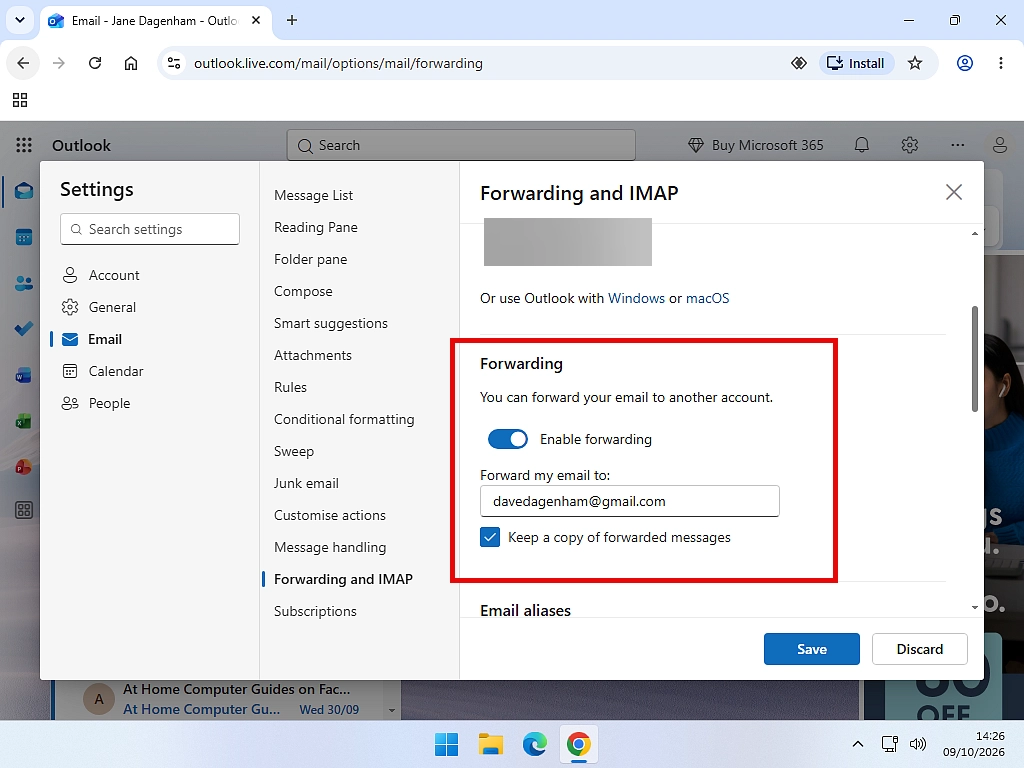
- Sign in to Outlook.com and click the Settings icon (the gear wheel) at the top right.
- Click Mail (or Email) in the left hand column, then Forwarding.
- You’ll probably have to click the Sign In button and go through the steps to authenticated yourself.
- Turn on Enable forwarding and type your Gmail address.
- Tick Keep a copy of forwarded messages if you want them to stay in Outlook.com as well.
- Click Save.
If you haven’t turned on two-step verification for your Microsoft account, Outlook.com asks you to do that first. It’s worth doing anyway.
Forward BT Emails to Gmail
- Sign in to BT Email in your web browser and click Settings on the toolbar.
- Click Mail in the menu on the left.
- Choose Auto forward.
- Tick Auto forward all incoming emails and type your Gmail address.
- Tick Keep copy if you want them to stay in BT Email as well.
- Click Save.
Forward Virgin Media Emails to Gmail
Virgin Media Mail has an automatic forwarding setting in its webmail settings. Once it’s on, you’ll see a message saying auto forwarding is active at the top of your inbox.
- Sign in to Virgin Media Mail and open Settings.
- Find the Auto forward setting.
- Turn it on and type your Gmail address.
- Save your changes.
Keep an Eye on Your Old Spam Folder
Emails that your old provider decides are spam usually aren’t forwarded. Sign in to the old account every few weeks and have a quick look, in case something you wanted got caught.
Option 2: Add the Account to the Gmail App on Your Phone
The Gmail app on Android phones and iPhones can still show your other email accounts, and Google says that carries on after January.
- Open the Gmail app and tap your profile picture at the top right.
- Tap Add another account.
- Choose your provider, such as Yahoo or Outlook. For BT, Sky, Virgin Media and others, choose Other.
- Sign in and follow the steps on screen.
The account shows up in the app as a separate inbox. Tap your profile picture to switch between them. You can reply from your old address in the app too.
The downside is it’s only on your phone. On your computer, Gmail won’t show those emails.
Option 3: Move Your Emails Into Gmail and Switch Address
If you’re happy to use your Gmail address from now on, this is the tidiest answer. Gmail’s Import mail and contacts tool still works. It copies all your old emails and contacts into Gmail, and it brings in new emails for 30 days while you tell everyone your Gmail address.
You’ll find it on the same Accounts and Import tab. Gmail says it works with Yahoo, Hotmail, AOL and other webmail or POP3 accounts. How to Transfer Yahoo Mail to Gmail walks through it step by step, and the steps are the same for other providers.
Two things to watch. Gmail’s free 15GB is shared with Google Drive and Google Photos, so a big old mailbox might not fit (see Gmail Storage Full? Here’s Why (and How to Fix it)). And don’t close your old account straight away, in case something important still goes there.
Option 4: Use an Email Program on Your Computer
If you want to keep using your old address on a computer, put all your accounts in one email program instead of in Gmail.
Windows 11 comes with the Outlook app, which is free and can hold your Gmail, Outlook.com, Yahoo and most other email accounts together. How to Setup Your Email Accounts in Outlook for Windows App shows you how to add each one.
Mozilla Thunderbird is another free option that does the same job.
You Don’t Need to Pay for a Replacement
Several companies are selling their email programs as Gmailify replacements. You don’t need one. Forwarding, the Gmail app, the Outlook app and Thunderbird are all free.
What About Send Mail As?
If you send emails from your BT, Yahoo or Hotmail address while you’re in Gmail, that stops in January 2027 too. Gmail will only let you send from Gmail addresses.
You’ve got three choices:
- Send from your Gmail address instead. The simplest. People will reply to your Gmail address and, over time, start using it.
- Use the Gmail app on your phone with the old account added (Option 2). You can send from it there.
- Use your provider’s own website or app, or the Outlook app on your computer (Option 4), to send from your old address.
Sending from another Gmail address, or from a Google Workspace address, isn’t affected.
Troubleshooting
There’s No Option to Add an Account Under Check Email From Other Accounts
That’s the change. Since April 2026, Gmail doesn’t let anyone set up a new link, so the section just shows Learn more. Use one of the options above instead.
My Other Emails Have Stopped Arriving in Gmail
From January 2027 that’s expected, and nothing will bring it back. Pick one of the options above.
If it happens before then, look at the account on the Accounts and Import tab for an error message. The usual cause is a changed password on the other account. Some providers also now ask for a special app password instead of your normal one. Other Causes.
Forwarded Emails Aren’t Arriving in Gmail
- Check Gmail’s Spam folder. Forwarded emails sometimes land there at first. Mark them as Not spam.
- Check the forwarding is switched on in your old account, and that your Gmail address is typed correctly. Retyping it fixes it surprisingly often.
- Remember it only forwards new emails, not ones already there.
Gmail Says My Storage Is Full
Imported emails count towards Gmail’s free 15GB, along with Google Drive and Google Photos. Gmail Storage Full? Here’s Why (and How to Fix it) has the quickest ways to free up space.
Frequently Asked Questions
Q: What is Gmailify?
A: Gmailify is a Gmail setting that links a Yahoo, Outlook.com, Hotmail or AOL account to Gmail, so its emails arrive in your Gmail inbox with Gmail’s spam filter and tabs. Google is ending it in January 2027.
Q: When is Gmailify ending?
A: Nobody new could set it up after March 2026. If you already use it, it keeps working until January 2027, then stops.
Q: Will I lose the emails Gmail has already collected?
A: No. Everything Gmail has already brought in stays in your Gmail. Your other email account isn’t affected either.
Q: Is Check email from other accounts ending too?
A: Yes, at the same time. From January 2027, Gmail stops collecting emails from other accounts with POP. In US English it’s called Check mail from other accounts.
Q: Can I still send emails from my other address in Gmail?
A: Only until January 2027. After that, Send mail as only works for Gmail and Google Workspace addresses.
Q: Does this affect using Gmail in Outlook or Thunderbird?
A: No. That’s the other way round, reading your Gmail in another program, and it carries on working.
Q: Is there a free alternative to Gmailify?
A: Yes. Set your other account to forward emails to Gmail if your provider allows it, add the account to the Gmail app on your phone, or use the free Outlook app in Windows 11 or Thunderbird to see all your accounts in one place.
Q: Do I need to pay for a replacement email program?
A: No. Some companies sell their programs as Gmailify replacements, but the free options do the same job.
Summary
In January 2027 Gmail stops collecting emails from your other accounts. Gmailify, Check email from other accounts and Send mail as for non-Gmail addresses all go at once. Emails already in Gmail stay put.
Check the Accounts and Import tab to see if it affects you. If it does, forwarding is the easiest fix where your provider allows it. If not, the Gmail app on your phone, the Outlook app on your computer, or moving to your Gmail address will all do the job, for free.
Related Posts
How to Transfer Yahoo Mail to Gmail
How to Setup Your Email Accounts in Outlook for Windows App
How To Use The Outlook For Windows App
Change Your Name in Yahoo Mail
The name people see when you email them often decides whether your email gets opened or ignored.
Change your Yahoo Mail sending name in a minute, in both the new and old Yahoo Mail.
You can find this and other related step by step guides in – At Home Computer Email Guides
Written by Jeff Porter. I’ve been fixing Windows PCs since 2010 and I’m CompTIA Network+ certified. More about me