
Microsoft has taken the Windows 7 downloads off its servers, so there’s no longer an official page where you can just download a Windows 7 ISO file.
That doesn’t mean you’re stuck. But it does mean the honest answer is a bit longer than a download button.
In this guide I’ll show you what actually still works in 2026. If your computer is a Dell that came with Windows 7, you can still get the exact image it was sold with, straight from Dell. I’ll walk you through that one step by step.
I’ll also cover the other legitimate ways to get hold of a Windows 7 disc image, and I’ll tell you which sites to walk away from. There are a lot of them.
Table of contents
- Can You Still Download A Windows 7 ISO In 2026?
- Why Microsoft Removed The Windows 7 Downloads
- How To Download A Windows 7 ISO From Dell
- Other Ways To Get Windows 7 If You Already Own It
- Windows 7 2026 Edition Is Not A Real Version Of Windows
- Why I Won’t Send You To A Free Windows 7 Download Site
- If You Only Need Windows 7 For One Old Program
- Troubleshooting
- Frequently Asked Questions
- Summary
Can You Still Download A Windows 7 ISO In 2026?
Not from Microsoft, no.
There used to be a page on Microsoft’s site where you typed in a Windows 7 product key and it gave you the matching disc image to download. That page no longer offers disc images. Microsoft never put out a statement explaining why it went. It just went.
So there’s no official, general purpose Windows 7 download any more. Anyone telling you there is either has a copy sitting on their own server, or they’re pointing you at somebody else’s upload.
There are still three legitimate ways to end up with a Windows 7 ISO file.
- You already own the media. An original retail disc, or a recovery partition on the PC it came with.
- Your PC is a Dell that shipped with Windows 7, so you can pull its original image back down from Dell.
- You have a Visual Studio subscription, or access to volume licensing through work.
The Dell route is the one most people can actually use, so that’s the one I’ll go through properly.
Why Microsoft Removed The Windows 7 Downloads
Because Windows 7 is finished, and has been for years.
- Mainstream support ended on 14 January 2020.
- Extended Security Updates, which businesses could pay for, ended on 10 January 2023.
That’s three years and counting with no security patches of any kind. Not for Windows itself, and not for Internet Explorer, which is still sat on there.
Think About Where You’re Going To Run It
My advice is not to put Windows 7 on a computer you use every day, and not to let it anywhere near the internet if you can help it. It’s unpatched, and most browsers stopped supporting it years ago.
If you need Windows 7 for one old program, run it inside a virtual machine instead. There’s a section on that further down.
How To Download A Windows 7 ISO From Dell
Dell still keeps recovery images for the computers it sold, and its own support pages still list Windows 7 alongside Windows 8.1, 10 and 11.
The important word is your. Dell’s recovery service works from a service tag, which is the unique code printed on a sticker on your PC. You give Dell the tag, Dell gives you back the exact version of Windows that machine was sold with.
A service tag isn’t a password and it isn’t a way of getting Windows for nothing. It’s Dell handing you back a copy of software you already paid for when you bought the computer.
So this method works if, and only if, you own a Dell that came with Windows 7 on it.
What You’ll Need
- A Dell desktop or laptop that was sold with Windows 7.
- A PC running Windows 10 or Windows 11 to do this on. Dell’s tool won’t install on Windows 7 itself, so if the old Dell is the only machine you’ve got, you’ll need to borrow another one.
- A 16 GB USB flash drive. It gets wiped, so don’t use one with anything on it.
- Your Windows 7 product key, for when you come to activate it.
Find Your Dell Service Tag
The service tag is seven characters, letters and numbers mixed. You’ll find it in one of three places.
- On a sticker. Underneath a laptop, or on the back or top of a desktop. On some laptops it’s on a little pull out tab at the front.
- In the BIOS. Tap F2 as the Dell logo appears when you switch on. It’s usually on the first screen.
- From Windows, if the machine still boots. Open PowerShell and run the line below.
Get-CimInstance -ClassName Win32_BIOS | Select-Object SerialNumberOn a Dell, the BIOS serial number and the service tag are the same thing.
Install The Dell OS Recovery Tool
Plug in your USB flash drive first. The Recovery Tool wants to see one before it’ll work properly.
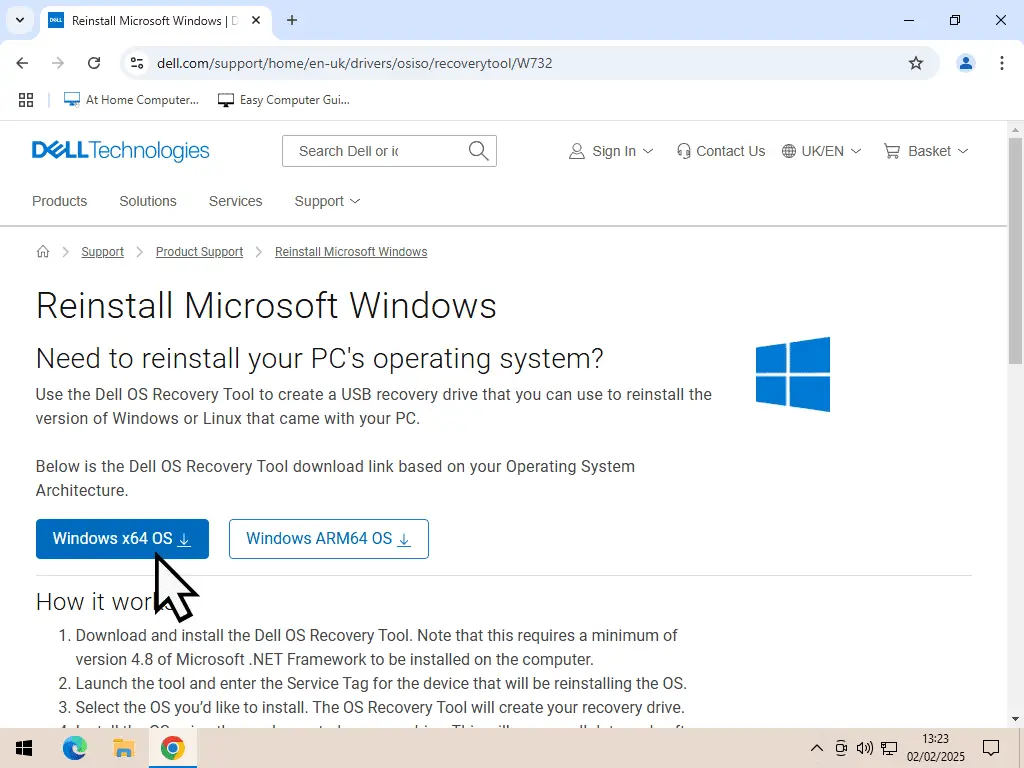
Then head over to Dell’s support site and search for the OS Recovery Tool, or go straight to the download page.
Dell OS Recovery Tool download page
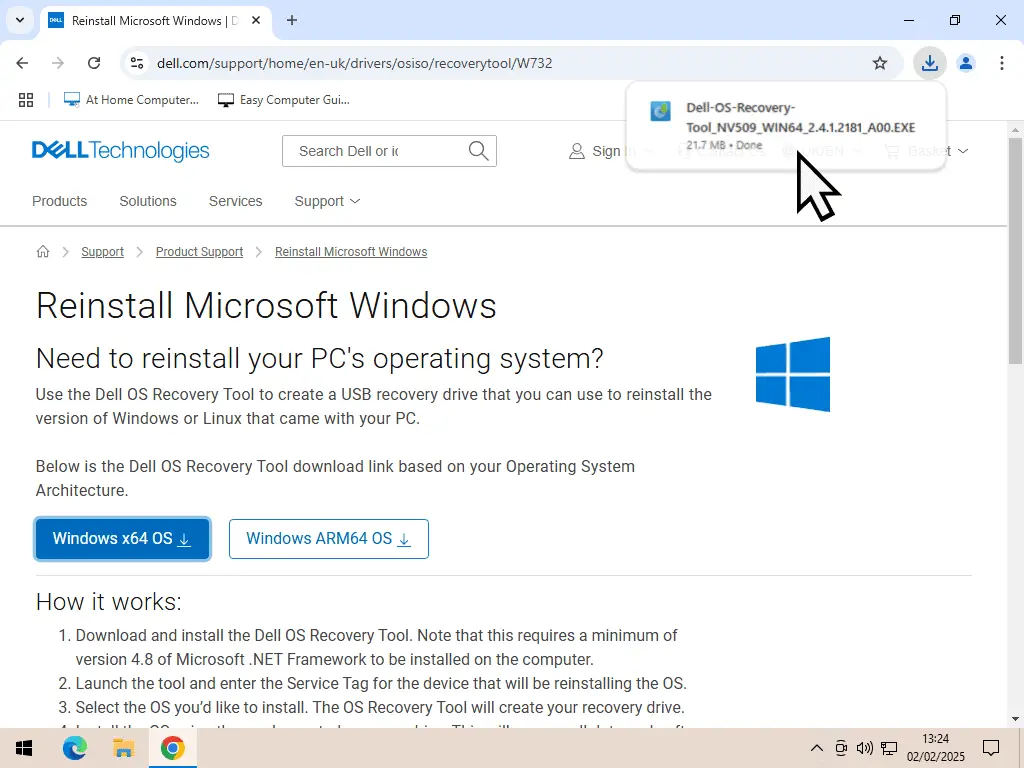
- Click the Download button for Windows x64 OS.
- Run the installer and let it install the Recovery Tool.
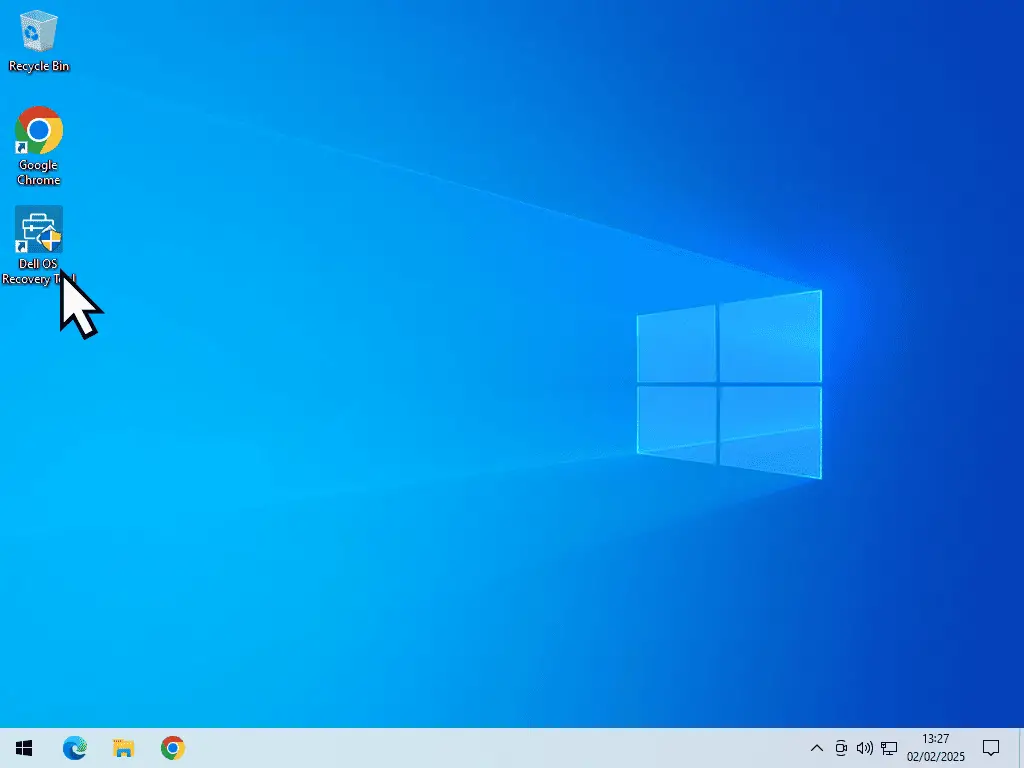
- Close your browser, then launch the Recovery Tool from the shortcut on your desktop.
Get Ready To Save The ISO File
Here’s the awkward bit, and it’s worth understanding before you start.
The Recovery Tool is designed to make you a bootable USB stick, not to hand you an ISO file. It downloads the image, builds the USB drive, then deletes the image again. All in one run that you can’t pause.
So if you want the ISO file as well as the USB stick, you have to copy it out of the temporary folder while the tool is still busy. That means having the folder open and ready before you start the download.
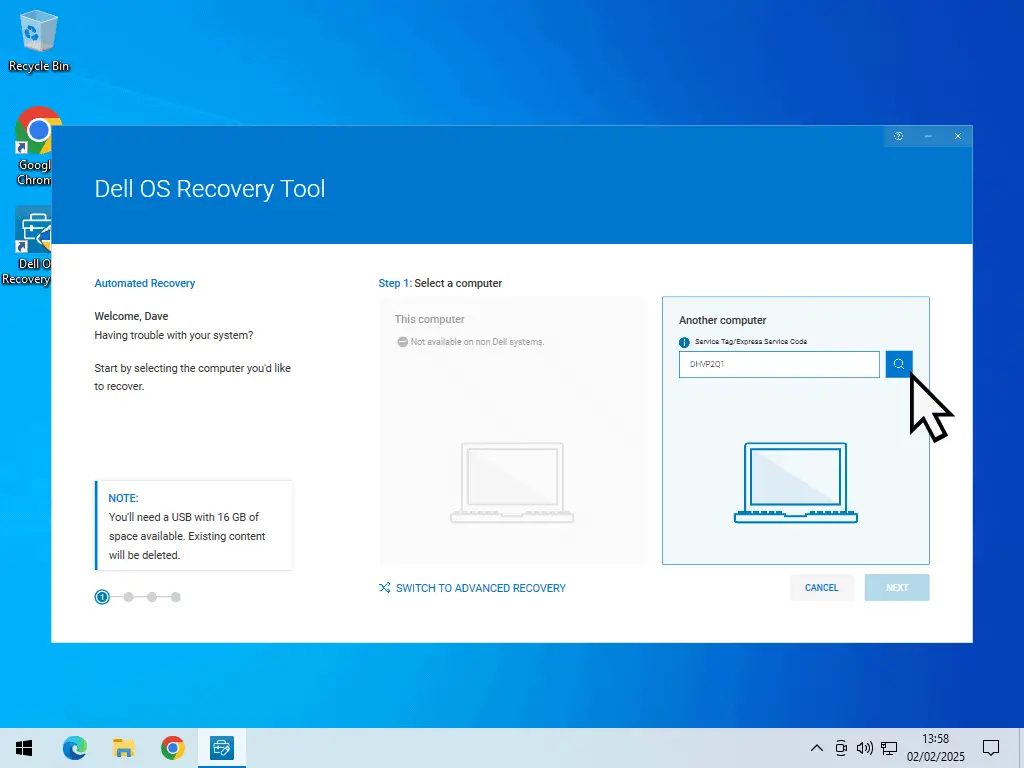
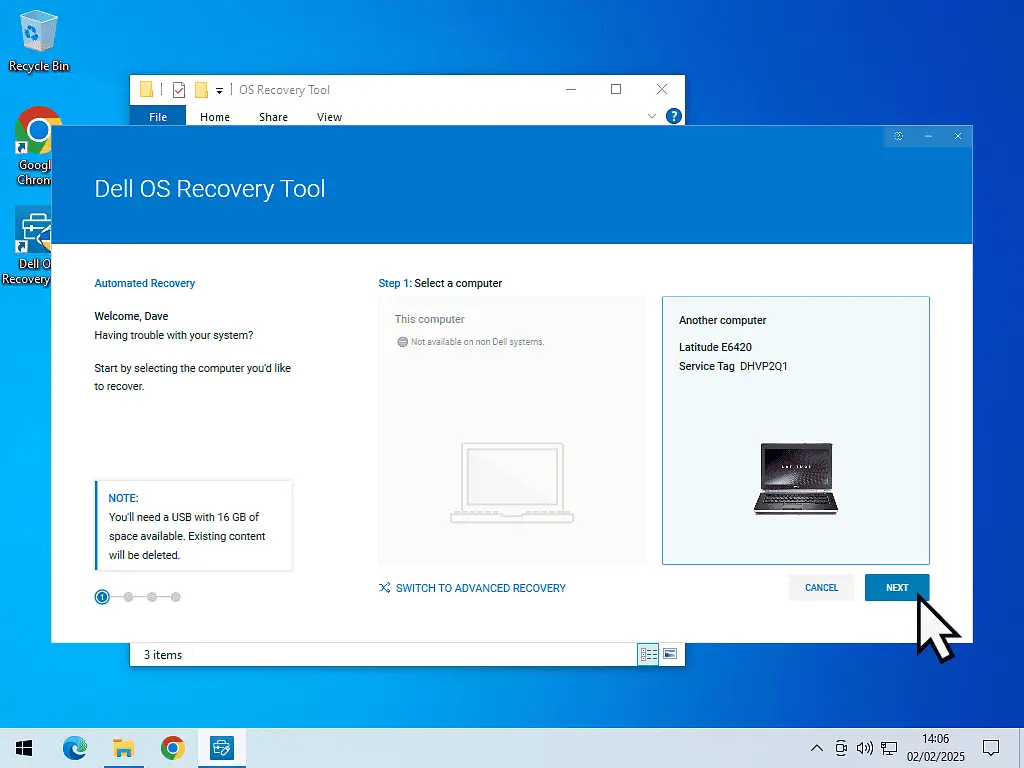
- When the Recovery Tool opens, choose Another Computer and type in your service tag. Click the search icon. Don’t click Next yet.
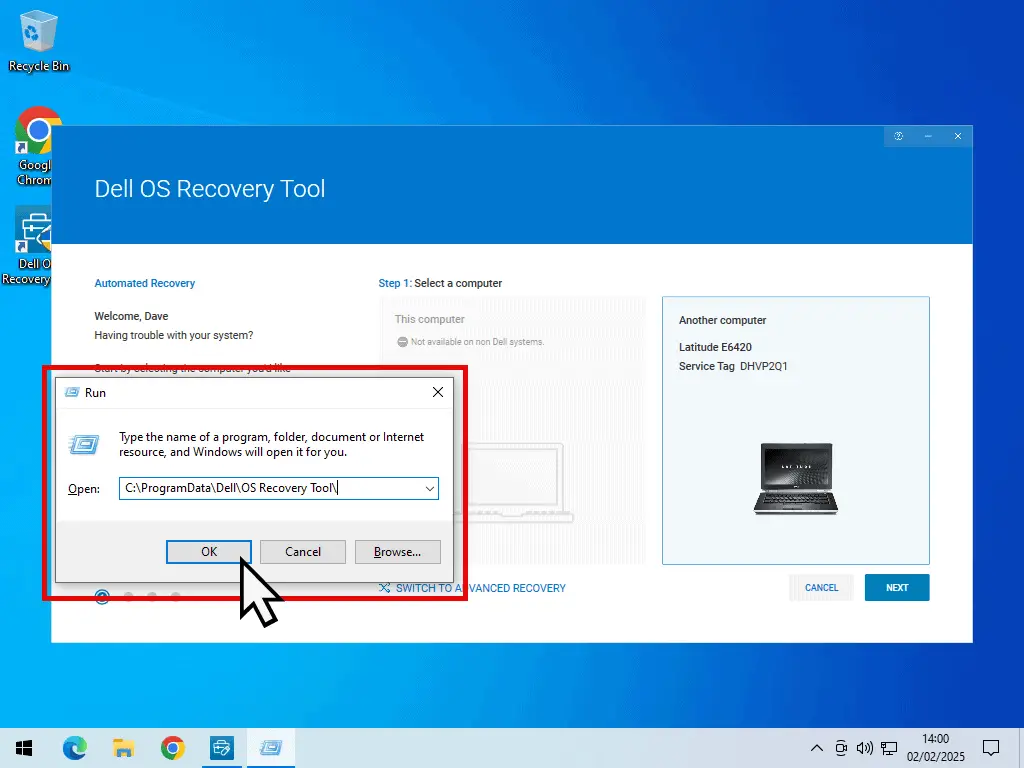
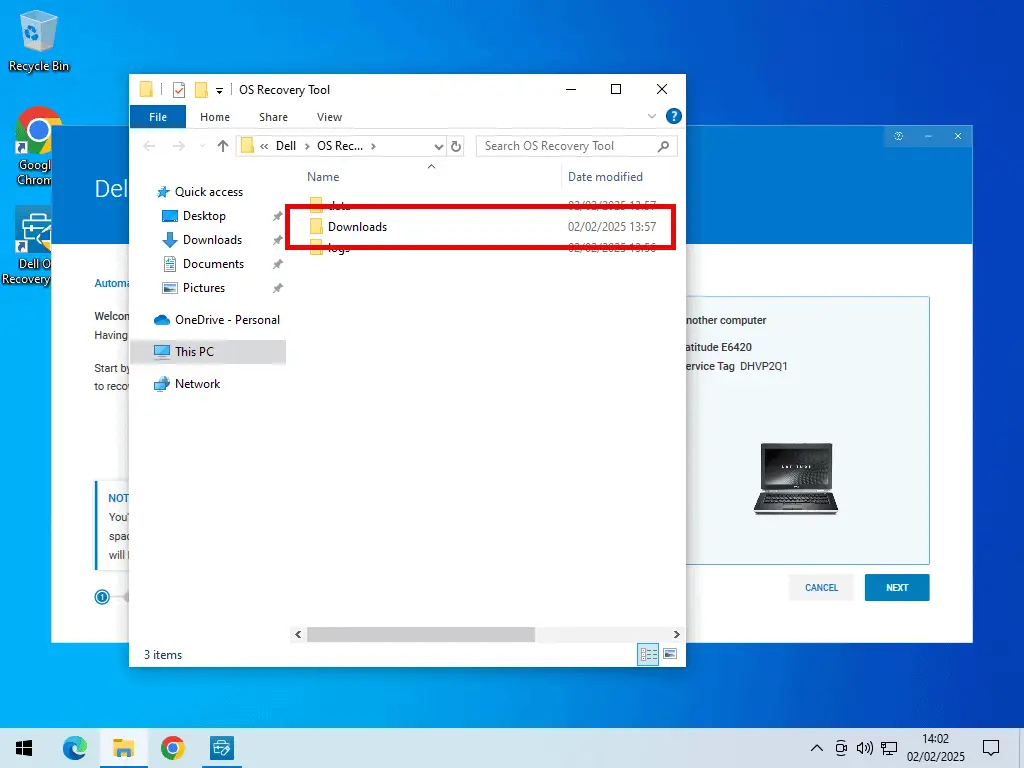
- Leave the Recovery Tool open. Press the Windows key and R together to open the Run box, then paste in the folder path below and click OK.
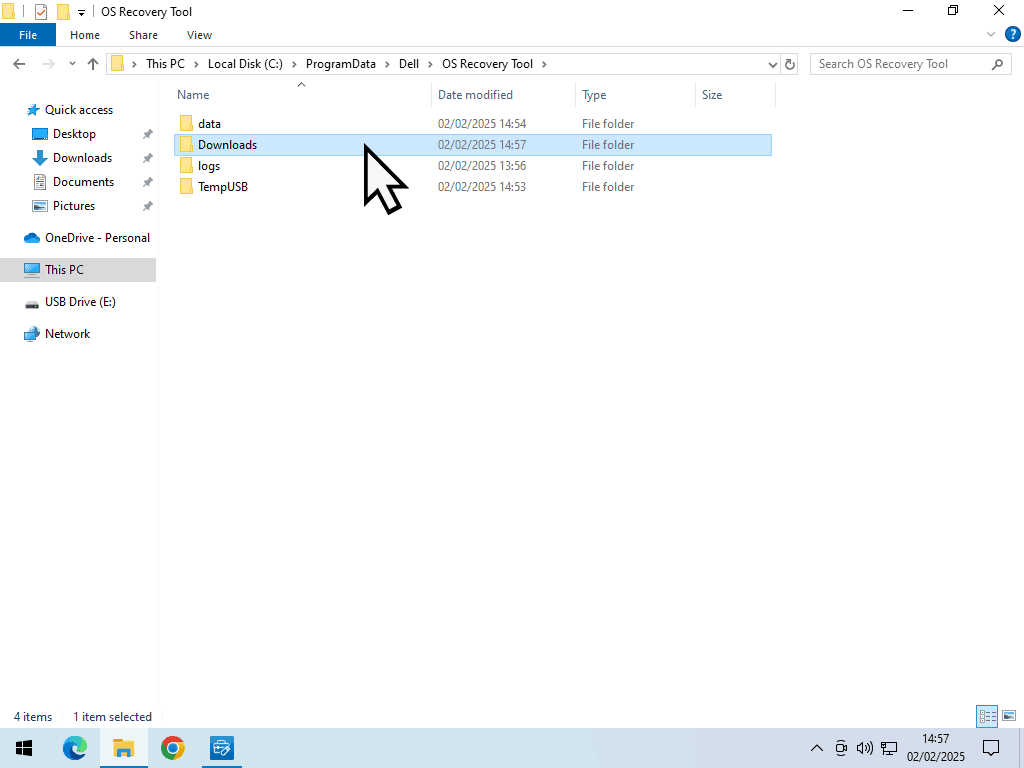
C:\ProgramData\Dell\OS Recovery Tool\- A File Explorer window opens. Inside it you’ll see a Downloads folder. That’s where the Windows 7 ISO lands. It’s empty at the moment, but leave the window open.
- Go back to the Recovery Tool and click Next.
Choose Your USB Drive
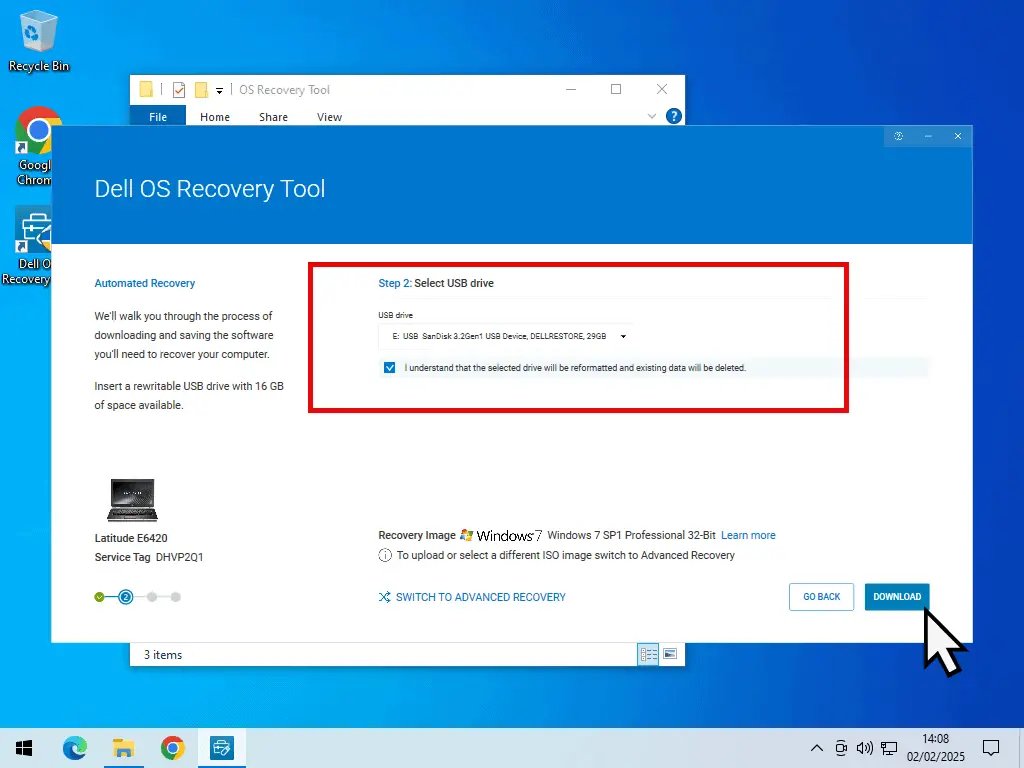
The Recovery Tool picks a USB flash drive for you. Check it’s the right one, and if it isn’t, click the arrowhead and choose another.
Tick the box that says you understand the drive will be reformatted, then click Download.
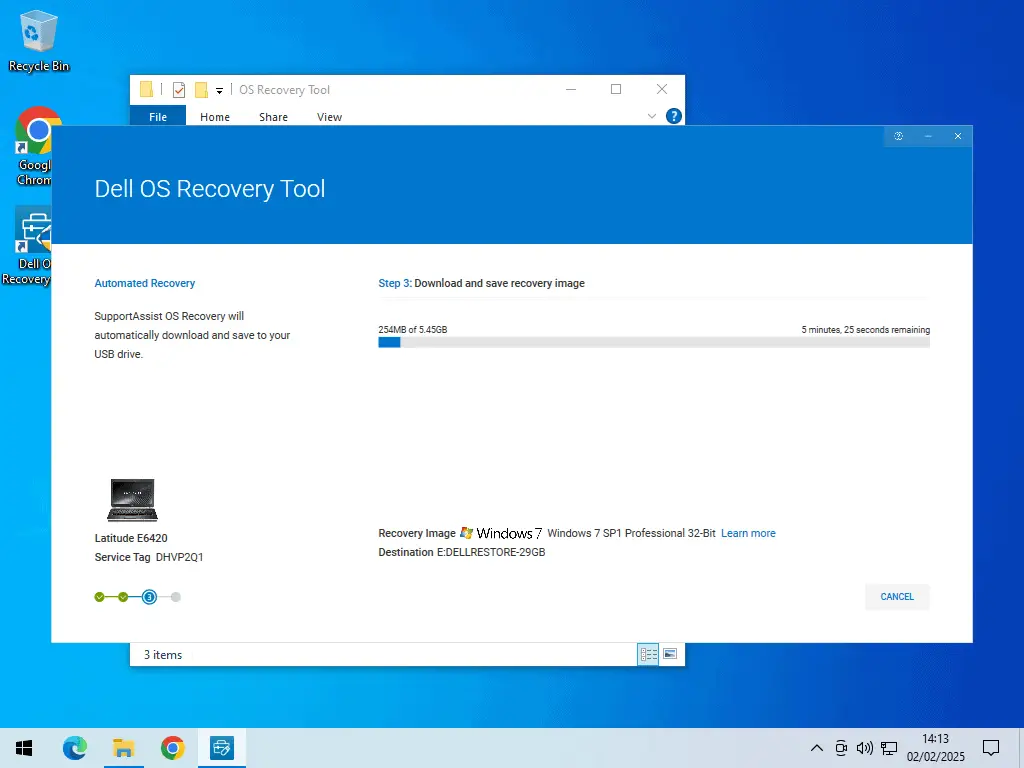
Now stay at your computer. You need to watch the progress bar, because the moment the download finishes you’ve got a job to do.
Save A Copy Of The Windows 7 ISO
- As soon as the download finishes, the Recovery Tool starts verifying the image. That’s your signal.
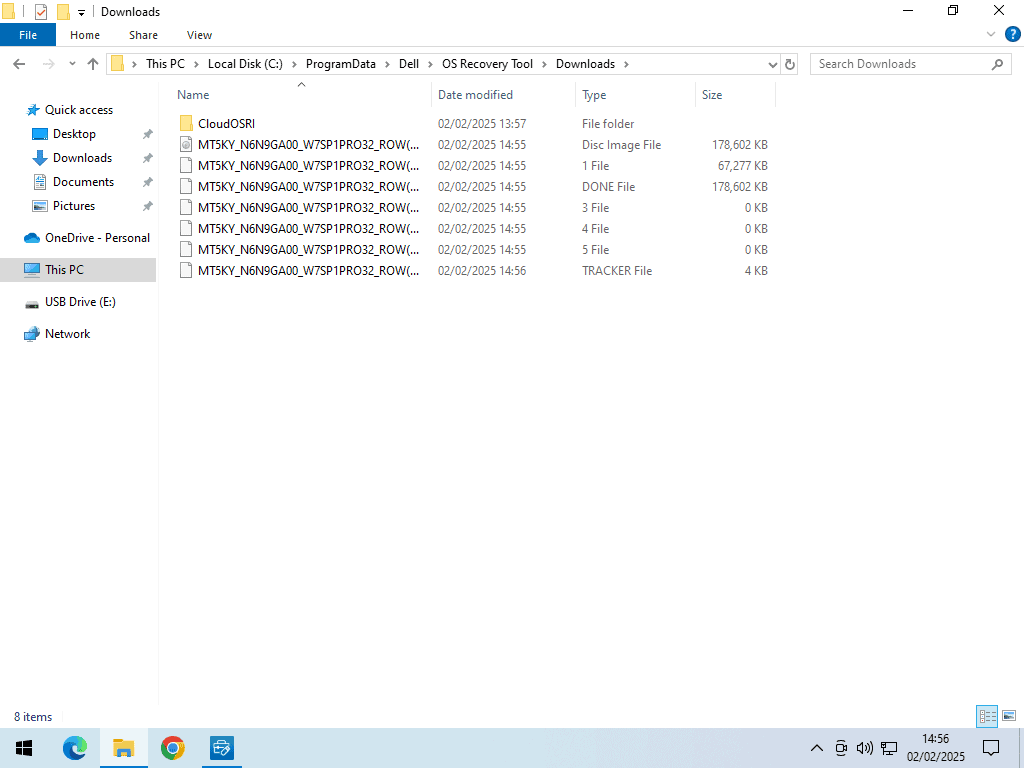
- Switch to the File Explorer window you left open and go into the Downloads folder. Click Continue if Windows asks for permission.
- You’ll see several files. Wait a moment and they’ll merge into one single ISO file.
- As soon as there’s just the one file, copy it and paste it somewhere safe. Your desktop will do.
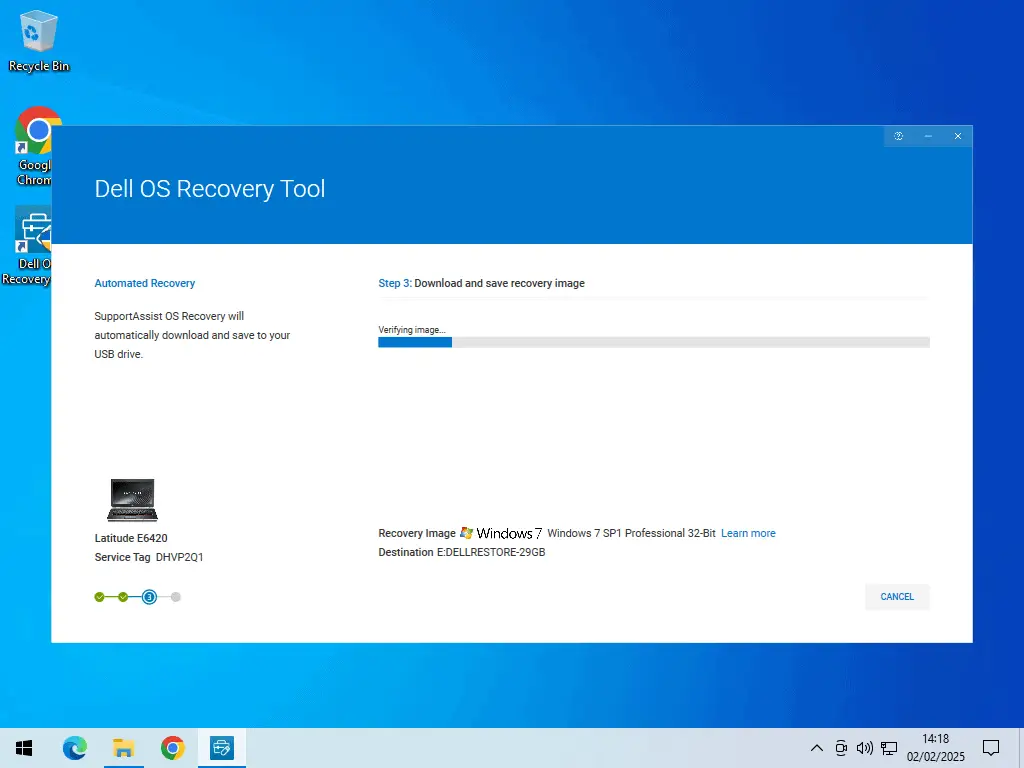
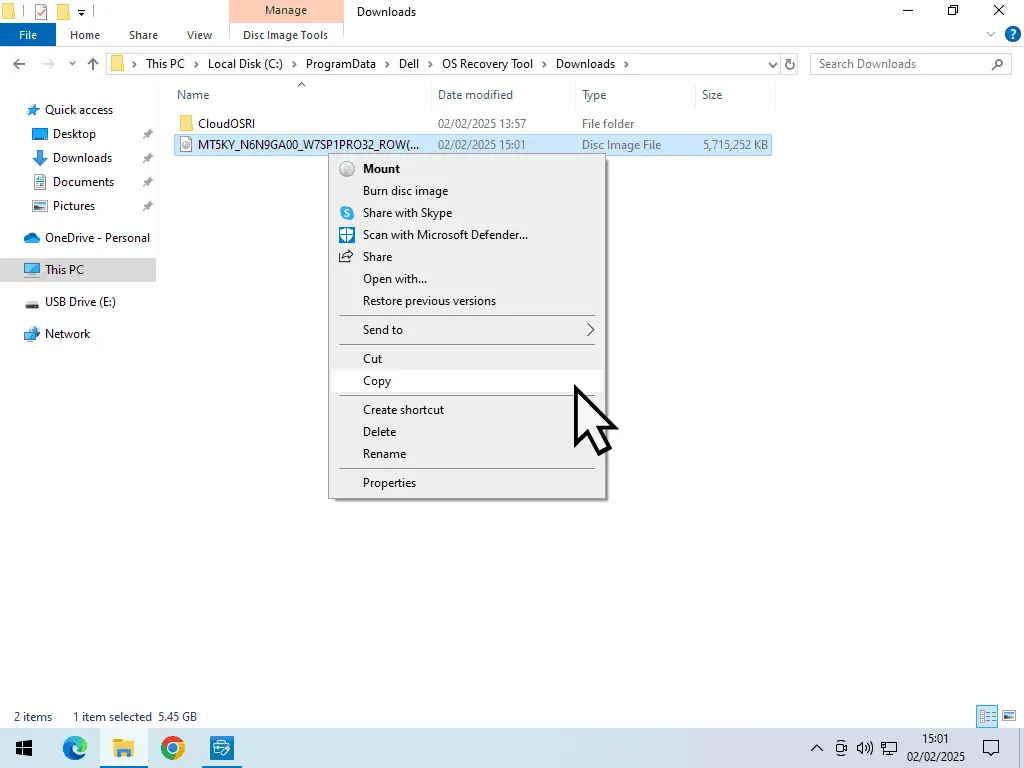
Let the Recovery Tool carry on in the background. There’s nothing more for you to do, and nothing you can usefully interrupt. When it’s finished it’ll delete the ISO from its own Downloads folder, which is why you had to be quick.
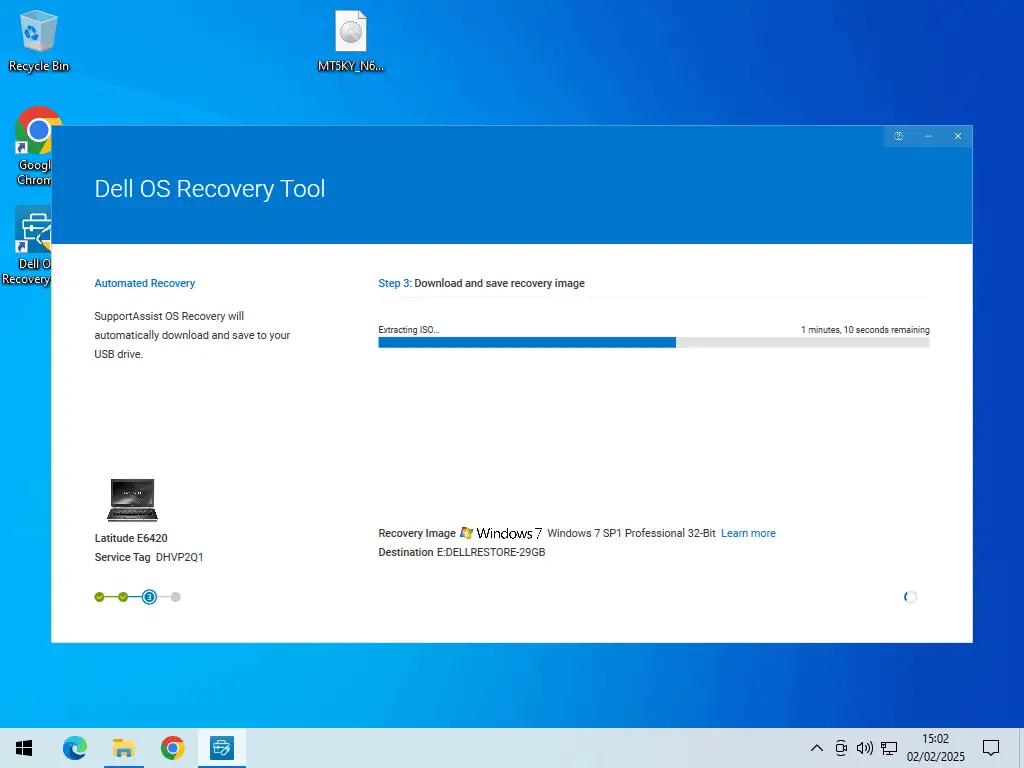
What You End Up With
Two things. A bootable USB flash drive you can use to reinstall Windows on that Dell, and a Windows 7 ISO file, which is the one you’d use to build a virtual machine.
Both are the original, untouched image that Dell shipped on that computer. Nothing has been added to it or taken out of it, which is exactly what you want and exactly what you don’t get from a download site.
Other Ways To Get Windows 7 If You Already Own It
Not everybody has a Dell. If the method above doesn’t apply to you, here’s what else is worth checking before you go looking at download sites.
Your Original Windows 7 Disc
If you’ve still got the DVD in a drawer somewhere, that’s the best copy you’ll ever get, and turning it into an ISO file takes about ten minutes.
I’ve written that one up separately, how to create an ISO image file from a disc.
A Recovery Partition On The Original PC
Lots of Windows 7 machines were sold with a hidden recovery partition instead of a disc, and a key combination at startup to trigger it. If the old PC still boots, it’s worth looking, because that partition holds the factory image.
Other Manufacturers’ Recovery Services
Dell isn’t the only one. HP, Lenovo, Acer and Toshiba have all run recovery media services at various times, working on the same idea of identifying your machine by its serial number.
They come and go, and none of them are as straightforward as Dell’s, but if you own the machine it costs nothing to search the manufacturer’s support site for recovery media and your model number.
Visual Studio Subscriptions And Volume Licensing
Microsoft still makes old operating systems available to developers with a paid Visual Studio subscription, and to organisations with a volume licensing agreement.
It’s not much use to most people at home. But if you work somewhere with an IT department, it’s worth asking, because they may well be able to get it for you in about two minutes.
Windows 7 2026 Edition Is Not A Real Version Of Windows
If you’ve been searching for Windows 7 lately you’ll have come across people talking about a Windows 7 2025 Edition, or a Windows 7 2026 Edition. Some sites will happily offer you one to download.
It doesn’t exist. There’s no such thing.
What people are talking about is a concept video by a designer who goes by Addy Visuals, imagining what Windows 7 might look like if Microsoft had carried on developing it. It got written up by gHacks and BetaNews in March 2026, which is where most of the interest came from.
It’s a design mock-up. A video. There’s no build, no installer and no ISO file, because there’s nothing there to install. Microsoft hasn’t said a word about bringing Windows 7 back, and isn’t going to.
So What Is In Those Downloads?
Nobody knows, and that’s the point. If a file is being sold to you as something that was never built, then whatever’s actually inside it isn’t what the label says.
Most of them are repackaged copies of ordinary Windows with a new theme bolted on, and often a good deal more than that. Don’t run them.
Why I Won’t Send You To A Free Windows 7 Download Site
Search for a Windows 7 ISO and you’ll find no shortage of sites with a big download button. They fall into three groups, and I’m not sending you to any of them.
Sites hosting the file themselves. You’ve no way of knowing where that copy came from or what’s been done to it. You’re trusting a website you’ve never heard of with administrator access to your computer.
Sites linking to public upload archives. Those copies may well be untouched originals. But “may well be” isn’t good enough when you’re installing an operating system, and a file being old doesn’t make downloading it legal.
Sites offering preactivated or fully activated Windows 7. That means somebody has broken the activation, which means they’ve modified the installer. Cracked installers are one of the most reliable ways there is to get malware onto a PC, and you’d be granting it full rights on the very first boot.
The Internet Archive. Search on the Internet Archive and you’ll find hundreds of versions on Windows 7 for download. The thing to keep in mind is that no-one has checked these files. They’re uploaded by people who may be honest, but may not be.
An ISO file isn’t a document. It’s an entire operating system, and everything in it runs with full control of your machine. It’s one of the few things where I’d say the source matters more than the file.
Checking An ISO You Already Have
If you’ve already got a Windows 7 ISO from somewhere and you want to know whether it’s been tampered with, you can work out its hash, which is a sort of fingerprint for the file. Open PowerShell and run this, putting your own file path in.
Get-FileHash -Algorithm SHA1 "path\to\your\windows7.iso"Then search for that hash. Microsoft’s original Windows 7 hashes are well documented, so if yours matches one of them the file is an untouched original. If it doesn’t match anything, that tells you something too.
If You Only Need Windows 7 For One Old Program
This is the situation most people are actually in when they come looking for a Windows 7 ISO. There’s one old program, or one bit of old hardware with a driver that stopped at Windows 7, and it won’t run on Windows 10 or 11.
Wherever you got the ISO from, don’t put Windows 7 on a real computer for that. Run it in a virtual machine instead.
A virtual machine is a computer that exists as a file on your normal PC. It boots, it runs Windows 7, it runs your old program, and when you close the window it’s just a file again.
- It doesn’t replace the Windows you already use.
- You can cut it off from the internet completely, which deals with the security problem.
- You can take a snapshot before you change anything, and roll it back in seconds if it goes wrong.
The ISO file you saved earlier is exactly what you need to build one. I’ve written the whole thing up here, how to set up a Windows 7 virtual machine on VMware Workstation Pro.
If the virtual machine won’t start, or the option is greyed out, it’s usually because virtualisation is switched off in your BIOS. There’s a fix for that too, how to enable virtualisation on your PC.
Troubleshooting
Dell Doesn’t Recognise My Service Tag
Check it character by character first. Service tags mix letters and numbers, and a 0 and an O look much the same on a worn sticker. Same with 1 and I.
If it’s definitely right and Dell still says no, the image for that machine may simply no longer be held. Dell doesn’t publish a list of what it keeps, so there’s no way to check in advance.
Dell Offers Me Windows 10, Not Windows 7
That means the machine was either sold with Windows 10, or Dell has updated what it holds for that model.
The recovery image is whatever that computer originally shipped with, so there’s no way to ask for a different version. If the tag belongs to a Windows 10 era machine, Windows 10 is what you’ll be offered.
The Recovery Tool Won’t Install On My Windows 7 PC
It isn’t meant to. Dell’s tool needs Windows 10 or Windows 11 to run on, which is awkward if the Windows 7 machine is the one you’re trying to fix.
You’ll need to borrow a newer computer to create the USB drive and the ISO file, then take them back to the old machine.
The ISO Vanished Before I Could Copy It
That’ll happen if you weren’t watching. The Recovery Tool deletes the image once it’s built the USB drive, and it doesn’t ask first.
No harm done, you just have to run it again. This time have the Downloads folder open before you click Next, and copy the file the moment the tool starts verifying.
Windows 7 Won’t Activate After Installing
The ISO doesn’t come with a key, and it was never going to. You need the product key for the copy of Windows 7 you own.
On a machine of that age it’s usually on a sticker, on the bottom of a laptop or on the side of a desktop. Worth knowing that online activation for Windows 7 can be unreliable now, so you may have to use the telephone activation option instead, which is still there in the activation window.
Frequently Asked Questions
Q. Can I still download Windows 7 from Microsoft?
A. No. Microsoft used to have a page where you entered a product key and downloaded the matching disc image, but it no longer offers disc images. There’s no official Microsoft Windows 7 download any more, and no statement from Microsoft explaining why it was removed.
Q. What’s the difference between a Windows 7 ISO and a Windows 7 disc image?
A. They’re the same thing. A disc image is an exact copy of a DVD stored as a single file, and ISO is the file format it’s stored in, hence the .iso on the end. So a Windows 7 ISO file, a Windows 7 image file and a Windows 7 disc image all mean the same thing.
Q. Is it legal to download a Windows 7 ISO?
A. It depends entirely on where it comes from and whether you own a licence. Getting your own computer’s recovery image back from its manufacturer is fine, because you paid for that copy when you bought the machine. Downloading Windows from a stranger’s upload is not, whether or not you own a key, and the fact that Windows 7 is old doesn’t change that.
Q. Do I need a product key?
A. Yes. None of the routes on this page include one. The ISO is just the installation media, so you need the key from the copy of Windows 7 you own. On machines of that age it’s usually printed on a sticker on the computer itself.
Q. Is Windows 7 2026 Edition real?
A. No. It’s a concept video by a designer called Addy Visuals showing how Windows 7 might have looked if development had continued. There’s no build and no ISO, so anything offering itself as a Windows 7 2026 Edition download is something else wearing the name.
Q. Can I use the Dell image on a computer that isn’t a Dell?
A. I wouldn’t. The image Dell gives you is tied to that specific machine’s licence, so using it elsewhere means installing Windows you haven’t got a licence for. It’s also built for that model’s hardware, so you can run into missing drivers on a different computer.
Q. Is it safe to still use Windows 7?
A. Not on a machine you use every day, and not online. It’s had no security updates since January 2020 and most browsers dropped support long ago. If you need it for an old program, run it in a virtual machine with the network turned off.
Summary
There’s no official Windows 7 download any more, and there isn’t going to be one. Microsoft closed that door and hasn’t explained itself.
If you’ve still got your original disc, use that. It’s the cleanest copy you’ll get and turning it into an ISO is easy.
If you haven’t, but your computer is a Dell that came with Windows 7, the method on this page will get you the original image back from Dell, using your own service tag. That’s the best option most people have, and it’s genuinely legitimate, because you’re only asking for the software you already bought.
And if neither applies, my honest advice is to stop looking. The download sites aren’t worth the risk, and if it’s one old program you’re after, a virtual machine solves the problem properly.
Related Posts
Windows 7 Virtual Machine On VMware Workstation Pro.
Truly the only way to use Windows 7 is on a virtual computer.
How To Create An ISO Image File From A Disc.
Got your own installation disc, create an ISO image file for it.
How To Fix Windows 7 Update Not Working.
After installing Windows 7 you’ll find that the Microsoft updates don’t work. This guide will show you how to get them working again.
How To Enable Virtualisation On Your PC.
Older computers may not have virtualisation turned on be default.
How to Setup a Windows 11 VM on VirtualBox
Windows 11 runs great on VirtualBox. You can use it even if your current PC doesn’t meet the system requirements.
You can find this and other related step by step guides in – At Home Computer VirtualBox Guides